


Are you struggling to find the perfect Recruiting Software that aligns with your complex demands? Our curated list of top-tier solutions offers personalization to meet your unique needs. Additionally, we've created a comprehensive comparison of JobAdder vs. Workable all in one place to simplify your decision-making process. JobAdder is rated 2.0 while Workable is rated 4.8.
You May Also Like
Featured products that are similar to the ones you selected below.
All Recruiting Software Products ›››


Compare pricing of JobAdder vs Workable with the following detailed pricing plan info. JobAdder has not provided information about its pricing. On the other hand, Workable comes in 3 packages: Starter, Standard, Premier.
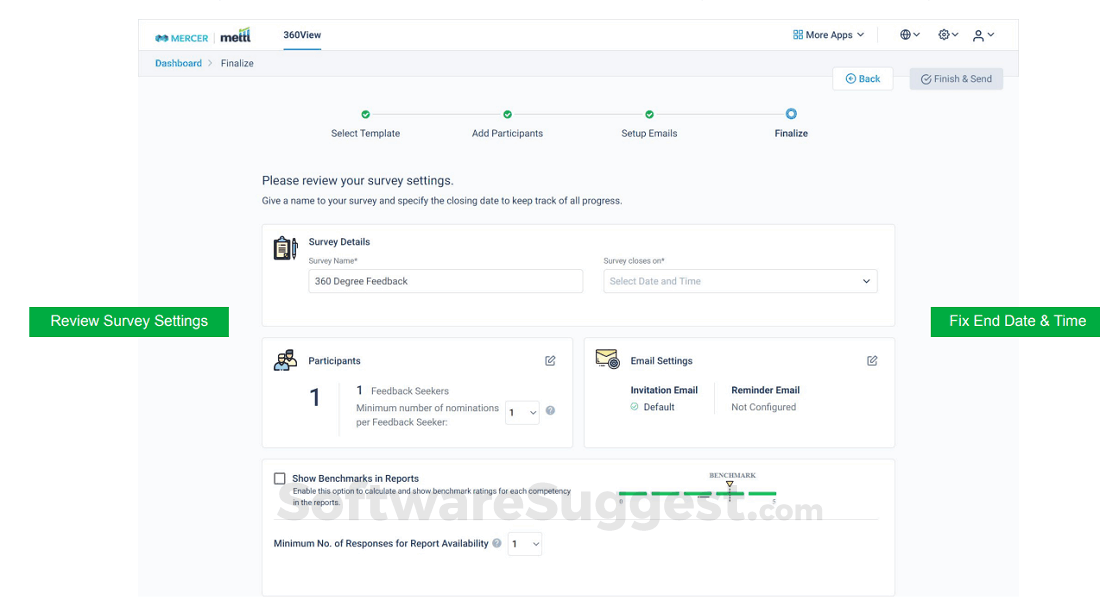
Take a look at the below screenshots and seamlessly compare the user interface of JobAdder and Workable for better insights.




JobAdder and Workable have been awarded by SoftwareSuggest for the selected categories. These awards have been given on the basis of the overall performance of this software in the Recruiting Software category.


Below is the comparison of the starting price and payment method of JobAdder and Workable. Information related to the payment plans of JobAdder is unavailable. Whereas, Workable provides Per Month payment plans. JobAdder provides a free trial whereas, Workable does not provide a free trial.
Free Trial
SAAS
Free Trial
Monthly
Yearly
Free Trial
Monthly
Yearly
Onetime(Perpetual license)
Transaction
Compare between JobAdder and Workable based on their key features and functionalities to pick the right one for your business.
CRM
Bulk Resume Parsing
Candidate Management
Internal HR
Interview Management
Self Service Portal
Billing & Invoicing
Commission & Payroll Management
Mobile Support
Online Tests & Psychometric Tests
Recruitment Management
Referral Management
Job Board Integration
Performance Metrics
Application Integration
Application Sharing
Recruiting Management
Resume Search
Multiuser Login & Role-based access control
Online Tests & Psychometric Tests
Bulk Resume Parsing
Data Security
User Management
Recruiting Management
Resume Search
Assessments
Background Screening
Candidate Management

Compare how JobAdder stacks up against Workable in terms of ratings and user experience. Select the Recruiting software that perfectly aligns with your business requirements.
Based on all the user reviews and ratings received by JobAdder and Workable in Recruiting Software category, we've provided an average user rating for each software below. JobAdder has 2 reviews while Workable has 6 reviews
Shiny when sold, terrible when in use
Pros
Price is lower than competition for low number of users
Cons
The platform offers next to none automation in an outdated and byzantine UI that ultimately fails to deliver the array of functions that were sold. The product is pretty fragmented with different features poorly integrated in the dashboard under a maze of menu options. Integrations don't always work as advertised because they don't maintain the same tech stack in all countries/servers.
Product
Pros
mostly liked is the tracking system which was more comfortable to view
Cons
Posting part on the site could be improvised and it could be more friendly and not restricted with count
Seamless but tedious
Pros
It’s seamless in terms of its UI. The fonts and designs are very easy to navigate.
Cons
I feel the feature of security and updates should be made easy for the users.
Deployment is a crucial factor to consider while buying Recruiting Software. JobAdder is available on Web App desktop platforms and IOS, Android mobile platforms. Workable is available on Web App desktop platforms and IOS, Android mobile platforms.
Web App
IOS
Android
Web App
IOS
Android
Windows
MacOs
The quality and timeliness of support are important parameters when comparing JobAdder with Workable. JobAdder offers Email, Phone and Training to its customers, while Workable provides Email, Phone and Live Support.
phone
training
phone
live support
phone
live support
tickets
training
JobAdder and Workable are supported in the following languages.
English
English
Chinese
English
German
Hindi
Indonesian
Italian
Kannada
Korean
Latin
Malayalam
Portuguese
Spanish
Thai
Turkish
Vietnamese
The target customer base of JobAdder vs Workable is mentioned below. Check which software fits your business requirements perfectly.
Startups
SMBs
Enterprises
Startups
SMBs
Enterprises
Startups
SMBs
Agencies
Enterprises
Find out which tools JobAdder and Workable integrate with and make the right choice. Get the Recruiting software that connects with your preferred apps for best results!
(Not Provided by Vendor)
BambooHR
Rippling
Namely
Cezanne
Indeed
HiBob
checkr
Certn
ADP
deel
Softone
Gsuite
Seek
Microsoft 365
Hired
Otta
Sparkhire
Wellfound
Criteria
Academic Keys
Adaface
Adzuna
Alljobs
Qualee
Rabota
Remote
(Not Provided by Vendor)
To gain a better understanding of how these JobAdder and Workable work, you can check out the videos below. Browse through the videos and make the right choice.



Get insight into the company details JobAdder and Workable and learn how they operate. Explore the company name, its location, and more!
Jobadder









.png)


.jpg)


.png)





.png)







.png)


