In search of the ideal CRM Software that caters to your unique needs? As a savvy buyer, you're likely interested in user ratings, pricing, customer support, languages supported, features, and more. We've created a comprehensive comparison of Pipedrive versus Hubspot CRM. To get better insight, here’s how users have rated these products. Pipedrive is rated 4.5 while Hubspot CRM is rated 4.6.
You May Also Like
Featured products that are similar to the ones you selected below.
All CRM Software Products ›››


Compare pricing of Pipedrive vs Hubspot CRM with the following detailed pricing plan info. Pipedrive comes in 5 packages: Essential, Advanced, Professional (Most Popular), Power, Enterprise. On the other hand, Hubspot CRM comes in 3 packages: Starter, Professional, Enterprise.
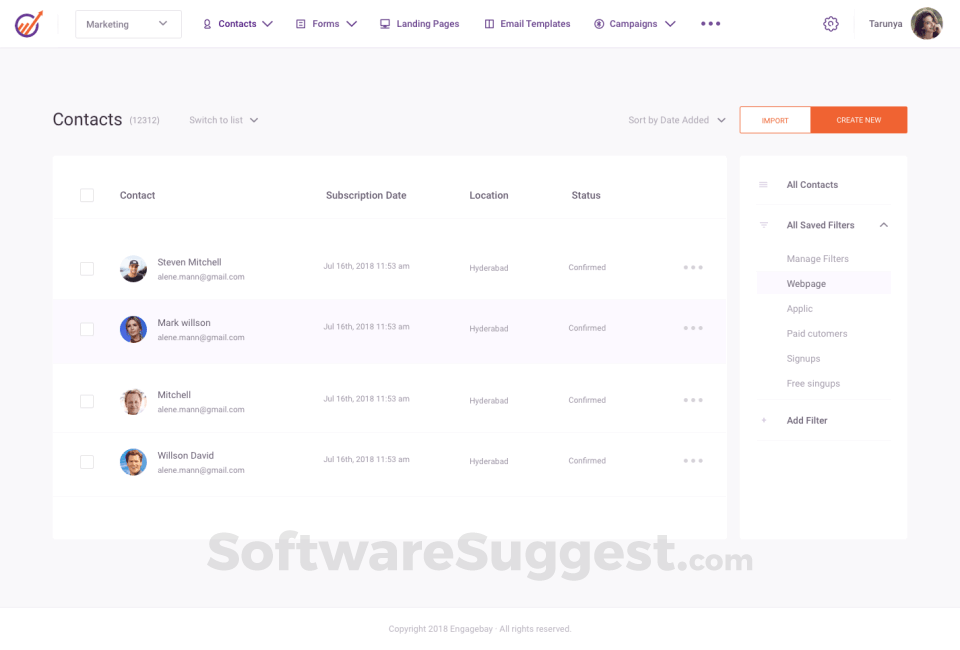
Take a look at the below screenshots and seamlessly compare the user interface of Pipedrive and Hubspot CRM for better insights.




Pipedrive and Hubspot CRM have been awarded by SoftwareSuggest for the selected categories. These awards have been given on the basis of the overall performance of this software in the CRM Software category.


Below is the comparison of the starting price and payment method of Pipedrive and Hubspot CRM. You can purchase Pipedrive with User/Month payment plans. Whereas, Hubspot CRM provides Per Month payment plans. Pipedrive provides a free trial whereas, Hubspot CRM does not provide a free trial.
Free Trial
Monthly
Yearly
Free Trial
Monthly
Yearly
Free Trial
Monthly
Compare between Pipedrive and Hubspot CRM based on their key features and functionalities to pick the right one for your business.
Accounting
CRM
CRM & Sales Dashboards
CRM & Sales Reports
CRM Analytics
CRM integration
Email Integration
Email Templates
Appointment Management
Sales Forecasting
Contact Manager
CRM & Sales Dashboards
CRM Analytics
Customer Support
Document Management
Email Marketing / SMS Marketing
Email Templates
Inventory Management
Knowledge Management
Marketing Analytics
Email Integration
Lead Generation
Marketing Automation
Task Management
Lead Management
Contact Management
Referral Tracking
Social Media Integration
Workflow Management
Forecasting

Compare how Pipedrive stacks up against Hubspot CRM in terms of ratings and user experience. Select the CRM software that perfectly aligns with your business requirements.
Based on all the user reviews and ratings received by Pipedrive and Hubspot CRM in CRM Software category, we've provided an average user rating for each software below. Pipedrive has 21 reviews while Hubspot CRM has 46 reviews
Best CRM for B2B Industry
Pros
The most impressive is the pipeline where we have the complete visibility of the deals with which are nurturing.
Cons
Nothing much but it doesn't have the utm tracking on the leads and also there is not open api to push leads into the other CRMs.
Intuitive CRM platform for SMB
Pros
easy to use
Cons
Need to update more features
Best CRM with robust features
Pros
I like the simple and easy to use interface of the product. It helps me in creating email campaigns with an ease
Cons
It has all the features but it lacks in some of the basic features. We cannot set a default font and default color while creating email templates
Deployment is a crucial factor to consider while buying CRM Software. Pipedrive is available on Web App, Windows, MacOs desktop platforms and IOS, Android mobile platforms. Hubspot CRM is available on Web App desktop platforms and IOS, Android mobile platforms.
Web App
Windows
MacOs
IOS
Android
Web App
IOS
Android
Web App
Windows
MacOs
IOS
Android
The quality and timeliness of support are important parameters when comparing Pipedrive with Hubspot CRM. Pipedrive offers Email, Live Support, Training and Tickets to its customers, while Hubspot CRM provides Email, Phone, Live Support, Training and Tickets.
live support
tickets
training
phone
live support
tickets
training
phone
live support
tickets
Pipedrive and Hubspot CRM are supported in the following languages.
Chinese
Czech
Dutch
English
Esperanto
Estonian
Finnish
French
German
Indonesian
Italian
Japanese
Korean
Latvian/Lettish
Norwegian
Polish
Portuguese
Russian
Spanish
Swedish
Turkish
Ukrainian
English
French
German
Japanese
Portuguese
Spanish
English
The target customer base of Pipedrive vs Hubspot CRM is mentioned below. Check which software fits your business requirements perfectly.
Freelancer
Startups
SMBs
Agencies
Enterprises
Startups
SMBs
Agencies
Freelancer
Startups
SMBs
Agencies
Find out which tools Pipedrive and Hubspot CRM integrate with and make the right choice. Get the CRM software that connects with your preferred apps for best results!
Google Workspace
Microsoft Office 365
Slack
Mailchimp
Zoom
Zendesk
Zapier
Trello
HubSpot
QuickBooks
Xero
Dropbox
Evernote
LinkedIn Sales Navigator
Calendly
Drift
PandaDoc
Proposify
SalesForce
Seventh Sense
Survey Monkey
EventBrite
Gravity Forms
Bitly
Unbounce
DataBox
TrenDemon
HotJar
CallRail
Wistia
TwentyThree
ReadyTalk
GoToWebinar
Beacon
(Not Provided by Vendor)
To gain a better understanding of how these Pipedrive and Hubspot CRM work, you can check out the videos below. Browse through the videos and make the right choice.



Get insight into the company details Pipedrive and Hubspot CRM and learn how they operate. Explore the company name, its location, and more!

.png)

















.png)