In search of the ideal Accounting Software that caters to your unique needs? As a savvy buyer, you're likely interested in user ratings, pricing, customer support, languages supported, features, and more. We've created a comprehensive comparison of TallyPrime versus FreshBooks. To get better insight, here’s how users have rated these products. TallyPrime is rated 4.7 while FreshBooks is rated 4.6.
You May Also Like
Featured products that are similar to the ones you selected below.
All Accounting Software Products ›››

.png)


Compare pricing of TallyPrime vs FreshBooks with the following detailed pricing plan info. TallyPrime has not provided information about its pricing. On the other hand, FreshBooks comes in 3 packages: Lite, Plus, Premium.
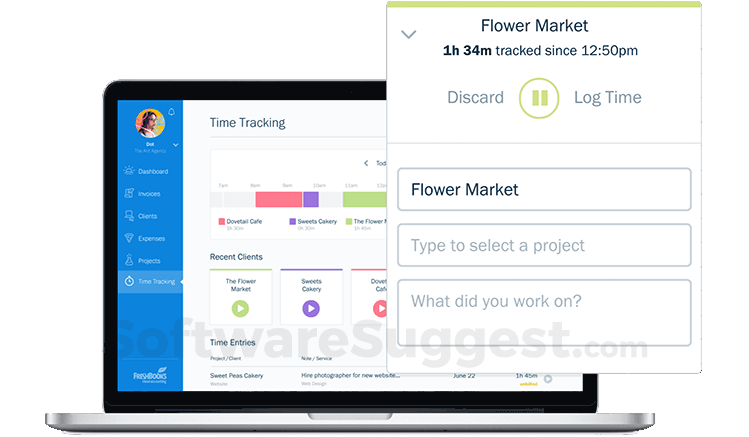
Take a look at the below screenshots and seamlessly compare the user interface of TallyPrime and FreshBooks for better insights.








TallyPrime and FreshBooks have been awarded by SoftwareSuggest for the selected categories. These awards have been given on the basis of the overall performance of this software in the Accounting Software category.


Below is the comparison of the starting price and payment method of TallyPrime and FreshBooks. Information related to the payment plans of TallyPrime is unavailable. Whereas, FreshBooks provides Per Month payment plans. TallyPrime provides a free trial whereas, FreshBooks does not provide a free trial.
Free Trial
Monthly
Yearly
Onetime(Perpetual license)
Free Trial
Monthly
Yearly
Free Trial
Monthly
Yearly
Compare between TallyPrime and FreshBooks based on their key features and functionalities to pick the right one for your business.
Accounting
Asset Management
Audit Trail
Banking Integration
Barcode Integration
Bonus
Loan & Advances Management
Budgeting
Customer Management
Customer Support
Budgeting
Expense Tracking
Invoice
Mobile Support
Multi Currency
Online Banking Integration
Recurring invoice
Reminders
Taxation Management
Time Tracking
Accounting
Asset Management
Audit Trail
Barcode Integration
Case Management
CRM
Customer Management
Email Integration
Event Management
Expense Management

Compare how TallyPrime stacks up against FreshBooks in terms of ratings and user experience. Select the Accounting software that perfectly aligns with your business requirements.
Based on all the user reviews and ratings received by TallyPrime and FreshBooks in Accounting Software category, we've provided an average user rating for each software below. TallyPrime has 355 reviews while FreshBooks has 30 reviews
Best Billing software for most businesses
Pros
The Go To tab is most update worthy feature in this application. Its saves a lot of time of the users. Everything is available in just a few clicks
Cons
Not recommendable for POS billing. Thermal printing features should be added
Best software
Pros
It's makes receipts and email services and handle accounts quict nicely. Also no need for many employees.
Cons
Service support needs to be more effective because many times when their is a problem. Some one should have their to slove
A Powerful and Versatile Solution: Oracle NetSuite ERPAs a business owner, I have always sought to streamline my operations and optimize efficiency. After extensive research and evaluations, I decided to implement Oracle NetSuite ERP, and I must say, it h
Pros
The user interface of Oracle NetSuite ERP is intuitive and user-friendly, making it easy for employees to navigate and utilize the software efficiently. The system provides a personalized dashboard that can be tailored to individual roles and responsibilities, ensuring that each user has access to the information and tools they need to perform their tasks effectively.
Cons
In conclusion, Oracle NetSuite ERP is an outstanding ERP system that combines comprehensive functionality, scalability, user-friendliness, and robust integration capabilities. It empowers businesses with the tools and insights necessary to streamline operations, enhance decision-making, and drive growth. I highly recommend Oracle NetSuite ERP to any organization seeking a top-tier ERP solution.
Deployment is a crucial factor to consider while buying Accounting Software. TallyPrime is available on Windows desktop platforms. FreshBooks is available on Windows, MacOs desktop platforms and IOS, Android mobile platforms.
Windows
Windows
MacOs
IOS
Android
Web App
Windows
MacOs
The quality and timeliness of support are important parameters when comparing TallyPrime with FreshBooks. TallyPrime offers Email, Phone, Live Support, Training and Tickets to its customers, while FreshBooks provides Email, Phone, Live Support, Training and Tickets.
phone
live support
tickets
training
phone
live support
tickets
training
phone
live support
tickets
training
TallyPrime and FreshBooks are supported in the following languages.
Arabic
Bengali/Bangla
English
Gujarati
Hindi
Indonesian
Kannada
Malayalam
Marathi
Panjabi
Tamil
Telugu
Dutch
English
German
Polish
Spanish
Swedish
Turkish
English
The target customer base of TallyPrime vs FreshBooks is mentioned below. Check which software fits your business requirements perfectly.
Startups
SMBs
Agencies
Enterprises
Freelancer
Startups
Startups
SMBs
Agencies
Enterprises
Find out which tools TallyPrime and FreshBooks integrate with and make the right choice. Get the Accounting software that connects with your preferred apps for best results!
(Not Provided by Vendor)
Square
Acuity Scheduling
NiceJob
WellyBox
SBPay.me
Stripe
BillBjorn
Lendflow
YouLend
TaxBandits
(Not Provided by Vendor)
To gain a better understanding of how these TallyPrime and FreshBooks work, you can check out the videos below. Browse through the videos and make the right choice.



Get insight into the company details TallyPrime and FreshBooks and learn how they operate. Explore the company name, its location, and more!
Oracle NetSuite North America


.jpg)











.jpg)


.png)


.png)