



DumpMedia Video Converter
Do you work at DumpMedia? Upgrade your plan to access the full benefits of SoftwareSuggest, and collect more reviews through marketing campaigns.
DumpMedia Video Converter Reviews & Product Details
DumpMedia Video Converter is the perfect tool for converting video and audio files that aren't compatible with your device, ripping DVD discs, editing videos, and boosting video quality. It offers a simple solution for all your video needs, making it easy to work.
DumpMedia Video Converter Starting Price
$10/Per Month

Our Awards and Recognition
Key Features of DumpMedia Video Converter
Here are the powerful features that make DumpMedia Video Converter stand out from the competition. Packed with innovative tools and advanced functionalities, this software offers a range of benefits.
- Video Conversion
- Audio Conversion
- Batch Conversion
- High Speed Conversion
- Video Editing
- Audio Editing
- Video Compression
- Audio Extraction
- Subtitle Addition
- Format Presets
- Device Presets
- Support 4k
- Support Hd
- Gif Maker
- Snapshot Capture
- Metadata Editor
- Video Merging
- Video Cropping
- Video Trimming
- Video Rotation
DumpMedia Video Converter Photos and Videos
Alternatives of DumpMedia Video Converter
Explore alternative software options that can fulfill similar requirements as DumpMedia Video Converter. Evaluate their features, pricing, and user feedback to find the perfect fit for your needs.
DumpMedia Video Converter Pricing
Here are the pricing plans for DumpMedia Video Converter. Choose the plan that best fits your requirements and budget. Get Detailed DumpMedia Video Converter pricing as per your requirements.
- Auto-renewal
- Cancel at anytime
- Auto-renewal
- Cancel at anytime
The pricing information for DumpMedia Video Converter is sourced either directly from the software provider or publicly available materials. To get the most accurate and up-to-date costs, we advise reaching out to the vendor.
The pricing information was last updated on 23rd September 2026.
Free Trial is available
DumpMedia Video Converter Specifications
Get a closer look at the technical specifications and system requirements for DumpMedia Video Converter. Find out if it's compatible with your operating system and other software.
DumpMedia Video Converter Description
Here's the comprehensive description of DumpMedia Video Converter. Gain a brief understanding of its unique features and exceptional benefits.
DumpMedia Video Converter is a comprehensive video conversion tool designed to simplify the process of converting videos and DVDs between a multitude of formats. This powerful software is equipped to handle a vast array of audio and video formats, making it an indispensable tool for anyone looking to optimize their media files for various devices and platforms.
Software Features:
Extensive Format Support: Convert videos and audio files into over 300 different formats, including but not limited to AVI, FLV, MP4, MKV, MOV, and more.
Device Compatibility: Offers preset profiles for a wide range of devices such as iPhone, iPad, Samsung Galaxy, Nokia Lumia, and many others, ensuring optimal playback quality.
High-Definition Conversion: Supports conversion of HD video formats like MP4, MOV, WMV, and more, maintaining high-quality output.
3D Video Format: Includes support for various 3D video formats, enabling the creation of immersive video experiences.
DVD Conversion: Capable of converting Home DVDs to digital formats for easy storage and playback.
Tutorial:
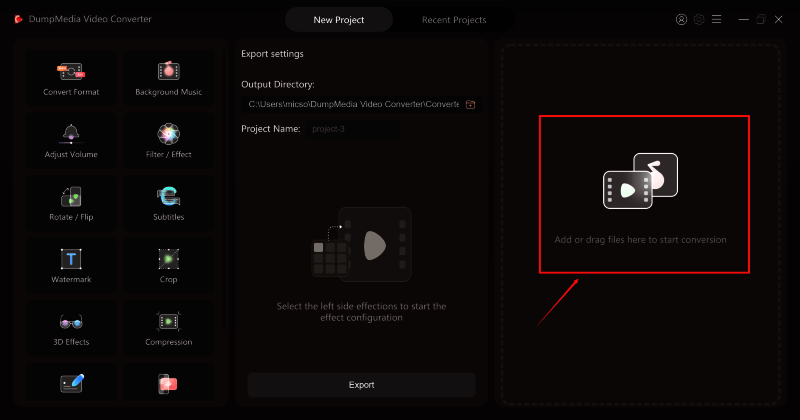
Select the Input Format: Choose the format of the video or audio file you wish to convert.
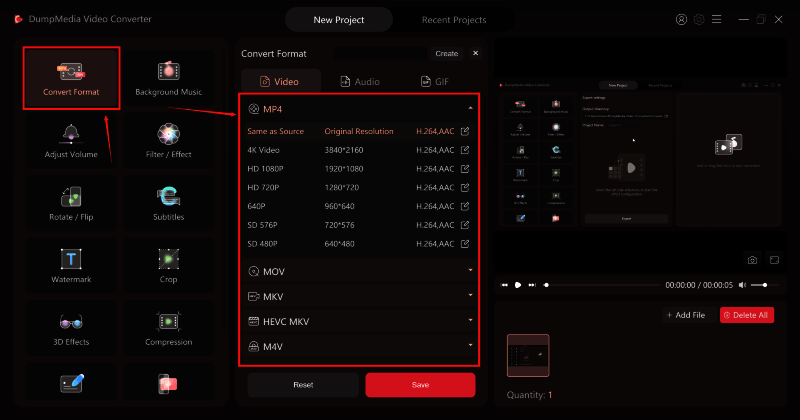
Choose the Output Format: Select the desired output format from the extensive list of supported formats.
Customize Settings: Adjust any necessary settings such as resolution, bitrate, and audio quality.
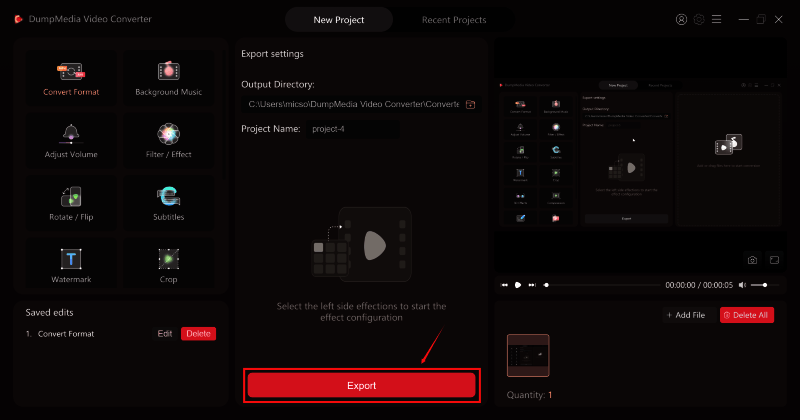
Start Conversion: Initiate the conversion process and wait for the software to complete the task.
Technical Specifications:
Operating System: Compatible with Windows 11/10/8.1/8/7 (32bits & 64bits) and Mac OS X 10.12 or higher.
Processor: Requires a 1.2GHz Intel or AMD CPU or above.
RAM: A minimum of 1G RAM or higher is needed for optimal performance.
Input Formats: Supports a wide range of audio and video formats, including HD and SD video formats, as well as Home DVDs.
Output Formats: Provides options for various audio formats, HD and SD video formats, 3D video formats, and more.
DumpMedia Video Converter Reviews (0)
No reviews yet. Rate this app or be the first to review.
Write a ReviewDumpMedia Video Converter FAQs
How much does DumpMedia Video Converter cost?
The starting price of DumpMedia Video Converter is $ 10/Per Month. It has different pricing plans:
- 1-Month License : $ 10/Per Month
- 1-Year License : $ 30/Per Year
- Lifetime License : $ 40/One Time
DumpMedia Video Converter also provides a free trial to users.
What are the top 5 features for DumpMedia Video Converter?
The top 5 features for DumpMedia Video Converter are:
- Video Conversion
- Audio Conversion
- Batch Conversion
- High Speed Conversion
- Video Editing
What type of customer support is available from DumpMedia Video Converter?
The available support which DumpMedia Video Converter provides is:
Connect with SoftwareSuggest experts to get the best quote for your business.



FTC Disclosure SoftwareSuggest may receive compensation from some vendors featured on this page. This does not influence our editorial evaluation or ratings.