


Best Payment Processing Software in 2026
Best payment processing software are MinDBODY, Sage Payment Solutions, Zoho Checkout, Braintree, and Wild Apricot. These online payment processing software solutions provide businesses with the means to process multiple business-to-business (B2B) payments.


No Cost Personal Advisor
Most Popular Payment Processing Software
SoftwareSuggest offers verified & unbiased user reviews based on user ratings and feedback. Our ratings and reports do not contain any paid placements. Learn more about our ranking methodology.
List of 20 Best Payment Processing Software

Contenders | 2026

Product Description
Melio allows you to pay vendors via bank transfer or credit/debit cards while automating manual work. Add vendor details easily, upload invoices, and schedule payments to enhance your cash flow. International payments are also supported in local currencies. Seamless integration with QuickBooks and Xero keeps... Read More About Melio
Melio Is Tailored For
StartUps
SMBs
Mid-Market
Enterprises
Features
- Vendor Management
- Data Export
- Multi User
- Mobile Access
- Quickbooks Integration
- Bank Reconciliation
- Check Payments
- Customizable Invoices
- View all Features
Melio Features and Usability-Based User Satisfaction Score
User Sentiment
Customers praise Melio for ease of use, time savings, QuickBooks integration, flexible payment methods (including credit card and mailed checks), and responsive customer support. Recurring limitations cited include lack of international payments and limited employee-pay features.
Contenders | 2026

Product Description
Bill.com is complete online-based accounting software for ACH payments, and sends electronic invoices and payment reminders. It takes less time to solve problems, and the unique content of the site attracts users. Read More About Bill.com
Bill.com Is Tailored For
StartUps
SMBs
Mid-Market
Enterprises
Features
- Check Payments
- Mobile Access
- Bill Payment
- Document Management
- Reporting And Analytics
- Fraud Detection
- Approval Workflow
- Vendor Management
- View all Features
Bill.com Features and Usability-Based User Satisfaction Score
User Sentiment
Users praise Bill.com for simplifying accounts payable/receivable, strong automation, seamless QuickBooks/Xero integration, time savings, secure cloud access, and easy invoicing. Recurring negatives note occasional slow page loads and a user interface that some feel could be improved.
Contenders | 2026

Product Description
Payoneer is a payment management software that helps you get paid in multiple ways online from any corner of the world. It is a boon to industries involved with consumers situated at a distance. Read More About Payoneer
Payoneer Is Tailored For
StartUps
SMBs
Mid-Market
Enterprises
Features
- Payment Request
- Affiliate Program
- Automated Clearing House (ach) Transfers
- Invoicing
- Mobile Access
- Currency Conversion
- Recurring Payments
- Api Integration
- View all Features
Payoneer Features and Usability-Based User Satisfaction Score
User Sentiment
Users praise Payoneer for ease of use, multi-currency support, local bank connectivity, security, and responsive customer support. Recurring negatives cite high currency conversion and withdrawal fees, limits on local withdrawals, removed foreign bank creation, and some mobile/app feature gaps.
Category Champions | 2026

The Digital Financial Workforce for enterprises
Product Description
OneFinOps is a Human-Governed, Audit-Ready Digital Financial Workforce that helps enterprises automate AP, AR, accounting, treasury, compliance, procurement, and FP&A. Digital Workers execute finance operations while humans approve every money decision. Read More About OneFinOps
OneFinOps Is Tailored For
StartUps
SMBs
Mid-Market
Enterprises
Features
- Role Based Access Control
- Email Integration
- Purchase Orders
- Tax Management
- Vendor Management
- Accounts Receivable
- Audit Trail
- Accounting
- View all Features
Starter
$ 22
Per Month
Growth
$ 56
Per Month
OneFinOps Features and Usability-Based User Satisfaction Score
User Sentiment
The reviewer felt OneFinOps centralizes receivables, payables, and compliance, improving visibility and reducing manual Excel work, making finance operations more organized. They noted generally good tracking of collections and vendor payments but mentioned reporting customization could be improved.
Category Champions | 2026

Cloud accounting software for small businesses
Product Description
FreshBooks is one of the best payment processing software programs that automates billing processes for small businesses and freelancers. FreshBooks handles billing by generating automated invoices, accepting online payments (ACH and credit card), and sending late payment reminders to accelerate cash flow. FreshBooks also allows... Read More About FreshBooks
FreshBooks Is Tailored For
StartUps
SMBs
Mid-Market
Enterprises
Features
- Bank Reconciliation
- Project Management
- Payments
- Double Entry Accounting
- Customizable Invoices
- Team Collaboration
- Estimates
- Client Management
- View all Features
Lite
$ 8
Per Month
Plus
$ 15
Per Month
Premium
$ 26
Per Month
FreshBooks Features and Usability-Based User Satisfaction Score
User Sentiment
Customers consistently praise FreshBooks for its intuitive, time-saving invoicing, expense and time-tracking features and responsive customer support, making it popular with freelancers and small businesses. Recurring criticisms include limited advanced features for larger firms, mobile app glitches, pricing as it scales, and some integrations.
Contenders | 2026

Product Description
Stripe is an acclaimed merchant service and one of the leading payment processing software companies with a high rating. Its transparent pricing structure and support for over 135 currencies make it popular among high-volume merchants. With instant account approval, Stripe is an attractive option for... Read More About Stripe
Stripe Is Tailored For
StartUps
SMBs
Mid-Market
Enterprises
Features
- Subscription Billing
- Financial Reporting
- Customer Management
- Api Integration
- Dispute Handling
- Payment Management
- Payouts
- Multi Currency
- View all Features
Standard Processing
$ 30
Per Transaction
Stripe Features and Usability-Based User Satisfaction Score
User Sentiment
Users praise Stripe for its easy integration, user-friendly interface, reliable fraud protection, and competitive fees that speed and simplify payments. Recurring negatives include slower payout timing versus competitors, limited mobile app features, occasional account verifications or false blocks, and customer support delays.
Category Champions | 2026

Product Description
PayPal is a top-rated payment solutions software and POS system for 2023, with a broad range of features and excellent name recognition. PayPal is ideal for e-commerce businesses as it is widely recognized and can increase customer confidence. PayPal offers a range of services that... Read More About Paypal
Paypal Is Tailored For
StartUps
SMBs
Mid-Market
Enterprises
Features
- Payment Management
- Refund Management
- Reporting And Analytics
- Virtual Terminal
- Multi Currency
- Subscription Management
- Payment Gateway
- Dispute Resolution
- View all Features
PayPal Payments Pro
$ 30
month
Paypal Features and Usability-Based User Satisfaction Score
User Sentiment
Users praise PayPal for ease of use, wide global acceptance, strong security, fast transfers and useful business features (invoicing, multi-currency). Common complaints focus on high fees-especially currency conversion and withdrawals-occasional account holds, limited customer support responsiveness, and country availability limits.

Software by Square, Inc
Product Description
Square Point of Sale is the best payment software for iOS and Android devices. It provides various features such as online payment processing, inventory tracking, sales reporting, and more. Square also offers card readers, including magstripe, chip, and contactless. Its virtual terminal feature enables merchants... Read More About Square POS
Square POS Is Tailored For
StartUps
SMBs
Mid-Market
Enterprises
Features
- Location Management
- Tip Management
- Mobile Pos
- Gift Cards
- Offline Mode
- Discount Management
- Customer Directory
- Customer Feedback
- View all Features
Basic
$ 60
Per Location
User Sentiment
Customers praise Square POS for its ease of use, quick setup, intuitive mobile apps, and useful real-time reporting that simplifies sales tracking. Recurring negatives note limited modularity, extra costs for add-ons, and restricted card payment availability in some countries, reducing suitability for service/hospitality.

Software by Authorize.Net
Product Description
Authorize.Net is a virtual point-of-sale software that eases card payments by converting a desktop or mobile device into a POS and using it with a card reader for secure payments. You can customize bills by adding tax rates and also email them to customers. Read More About Authorize.Net - duplicate product
Authorize.Net - duplicate product Is Tailored For
StartUps
SMBs
Mid-Market
Enterprises
Features
- Accounting
- Customer Information Manager
- Multi Currency
- Echeck Processing
- Payment Management
- Developer Apis
- Invoicing
- Sync For Quickbooks
- View all Features

Software by Adyen
Product Description
Adyen offers an all-in-one payment processing software that connects businesses to various payment methods, including global credit/debit cards and local options. Adyens secure checkout feature can be customized to provide a seamless payment experience, supporting over 250 payment methods, dynamic payment options based on customer... Read More About Adyen
Adyen Is Tailored For
StartUps
SMBs
Mid-Market
Enterprises
Features
- Recurring Payments
- Mobile Payments
- Multi Currency
- 3d Secure
- Currency Conversion
- Api Integration
- Payment Methods
- Pos Integration
- View all Features
User Sentiment
The reviewer finds the Adyen interface clear and easy to use, praising its transaction search and restricted-role data access for client support. However, they report poor customer support and unhelpful responses when investigating unclear deposits, leaving questions unresolved.

Software by Payline Data
Product Description
Payline Data is a fully featured Payment Processing Software designed to serve Agencies, SMEs. Payline Data provides end-to-end solutions designed for Windows. This online Payment Processing system offers ACH Check Transactions, POS Transactions at one place. Read More About Payline Data
Payline Data Is Tailored For
StartUps
SMBs
Mid-Market
Enterprises
Features
- Chargeback Management
- Invoicing
- E Commerce
- Pci Compliance
- Recurring Billing
- Payment Pages
- Fraud Prevention
- Point Of Sale (pos) Integration
- View all Features

Software by BlueSnap
Product Description
BlueSnap is revolutionizing the payment processing industry with its innovative solutions, offering seamless, secure transactions. Its transformative technology enhances user experience, streamlines operations, and drives business growth, setting a new standard for efficiency and reliability in digital payments. Read More About BlueSnap
BlueSnap Is Tailored For
StartUps
SMBs
Mid-Market
Enterprises
Features
- Payment Processing
- Payment Analytics
- Fraud Prevention
- Invoicing
- Marketplace Payments
- Pci Compliance
- Virtual Terminal
- Tokenization
- View all Features

Software by FIS
Product Description
Worldpay is a comprehensive payment solution that empowers businesses of all sizes to seamlessly manage transactions online, in-store, or via mobile. With global reach and innovative services, it ensures a smooth, scalable payment experience tailored to your business needs. Read More About Worldpay
Worldpay Is Tailored For
StartUps
SMBs
Mid-Market
Enterprises
Features
- Discount Management
- Table Management
- Gift Management
- Tip Management
- Order Management
- E Commerce
- Sales Reporting
- Secure Transactions
- View all Features

Software by 2Checkout.com, Inc
Product Description
2Checkout is the standard solution for the payment gateway. It is quite simple and attractive in appearance. It supports multiple languages and currencies. It prevents fraud. The process is safe, reliable, and secure. It also supports mobile applications. Read More About 2Checkout
2Checkout Is Tailored For
StartUps
SMBs
Mid-Market
Enterprises
Features
- Sandbox Environment
- Third Party Integrations
- Affiliate Management
- Localized Payment Options
- Customer Support
- Customizable Checkout
- Detailed Reporting
- Seamless Integration
- View all Features
User Sentiment
The reviewer praises 2Checkout for extensive payment method support, useful merchant tools, effective affiliate marketing, and responsive, helpful support. They note the platform offers many options but can be messy and sometimes difficult to configure correctly.

Software by Braintree
Product Description
Braintree is a PayPal service, which helps you accept and process payments to maximize your business opportunities and revenue. It enables you to pay, send money, and accept payments, providing security to your data and credit card information. It accepts all payment modes. Read More About Braintree
Braintree Is Tailored For
StartUps
SMBs
Mid-Market
Enterprises
Features
- Recurring Billing
- Global Payments
- Third Party Integrations
- Customizable Checkout
- 3d Secure
- Payment Gateways
- Apple Pay Integration
- Tokenization
- View all Features
Standard
$ 3
Per Transaction
ACH Direct Debit
$ 1
Per Transaction
Category Champions | 2026

Product Description
Amazon Pay is an online payment processing software. It simplifies purchases for hundreds of millions of Amazon account holders, benefiting businesses of any size, type, or audience. With a seamless checkout experience that requires fewer clicks, businesses of all sizes can benefit from the trust... Read More About Amazon Pay
Amazon Pay Is Tailored For
StartUps
SMBs
Mid-Market
Enterprises
Features
- Global Reach
- Pci Compliance
- Refund Management
- Transaction Reporting
- One Click Payments
- Mobile Payments
- Api Integration
- Payment Gateway
- View all Features
Amazon Pay Features and Usability-Based User Satisfaction Score
User Sentiment
Customers praise Amazon Pay for fast, convenient, secure payments, wide merchant acceptance, strong cashback/offers, seamless Amazon integration and easy bill/UPI transactions. Recurring negatives include limited wallet-to-bank transfers, occasional transaction delays or processing hiccups, slow loading/UX issues and mixed customer support.
Contenders | 2026

Product Description
Klarna is your go-to solution for seamless shopping, offering flexible payment options and a user-friendly interface. Manage your purchases effortlessly, track upcoming payments, and enjoy a stress-free shopping experience tailored to your needs. Read More About Klarna
Klarna Is Tailored For
StartUps
SMBs
Mid-Market
Enterprises
Features
- Order Management
- Global Reach
- One Time Card
- Merchant Portal
- Customer Insights
- Instant Credit Decision
- Refund Management
- Fraud Protection
- View all Features
Klarna Features and Usability-Based User Satisfaction Score
User Sentiment
Customers praise Klarna for flexible, user-friendly payment options, clear budgeting tools, and responsive customer support that aid both shoppers and merchants. Recurring negatives include confusing T&C, potential credit impact from missed payments, limited merchant acceptance, occasional processing delays, and lack of offline POS support.

Software by Skrill Limited
Product Description
Skrill is an online wallet service. You can pay online, send money, use a Skrill card, and participate in a loyalty program. Skrill has assisted millions of customers in making, sending, and spending money since 2001. So Skrill it wherever you are and whatever you... Read More About Skrill
Skrill Is Tailored For
StartUps
SMBs
Mid-Market
Enterprises
Features
- Low Fees
- Instant Transfers
- Recurring Payments
- Api Integration
- Customer Support
- Cryptocurrency Support
- Merchant Accounts
- Instant Deposit Options
- View all Features
User Sentiment
Users praise Skrill for reliable, easy payments with instant deposits, global transfers and useful multi-currency support, noting long-term satisfaction. Recurring negatives are limitations on adding cards and unavailability of the prepaid Mastercard in the reviewers' country.

Software by Intuit Inc
Product Description
QuickBooks Payments is a great payment solutions software and mobile payment gateway suitable for small to midsize businesses. Its features include a card reader plugin, mobile app, and transaction software, enabling instant processing of credit and debit cards. The system provides real-time reporting and transaction... Read More About QuickBooks GoPayment
QuickBooks GoPayment Is Tailored For
StartUps
SMBs
Mid-Market
Enterprises
Features
- Tip Management
- Quickbooks Integration
- Invoicing
- Real Time Reporting
- User Permissions
- Secure Transactions
- Tax Calculation
- Customer Support
- View all Features
User Sentiment
The reviewer finds QuickBooks Online cost-effective with a single yearly fee and praises its ease of use. They note common complaints stem from users not properly setting up accounts or learning the tools, implying setup and learning curve issues for some users.

Software by Wave Financial Inc
Product Description
Wave Money is a comprehensive financial management tool for small businesses, offering invoicing, payments, accounting, banking, and payroll services. It simplifies bookkeeping, ensures data security, and provides expert support, all accessible via web and mobile apps. Read More About Wave Money
Wave Money Is Tailored For
StartUps
SMBs
Mid-Market
Enterprises
Features
- Kpi Tracking
- Scalability
- Real Time
- Data Warehousing
- Data Security
- Predictive Analytics
- Role Based Access
- Automated Alerts
- View all Features
Get Free Expert Advice

What Is Payment Processing Software?
Payment processing software facilitates the transfer of funds from one party to another. It allows you to accept payments via a credit card, debit card, e-check, and other digital payment methods.
The software also offers automated reconciliation and real-time analytics features to help you track your customer and financial data. Plus, you can enjoy the benefits of subscription management tools for recurring billing services or integrated marketing tools for content campaigns. Moreover, the integration of payment processing tools with financial management software lets automating the whole financial system of your business.
Comparison of the Best Payment Processing Software
|
Melio Visit Website |
Bill.com Visit Website |
Payoneer Visit Website |
|
|---|---|---|---|
| Overall Score | |||
| Pricing | Starts from $0 Forever | Starts from $29 User/Month | Available on request |
| Free Trial | ✓ | ✓ | ✓ |
| Business Size | Freelancers, Startups, SMBs, Mid-Market | Startups, SMBs, Mid-Market, Enterprises | Freelancers, Startups, SMBs, Enterprises |
| Key Features |
|
|
|
Benefits of Using Payment Processing Software
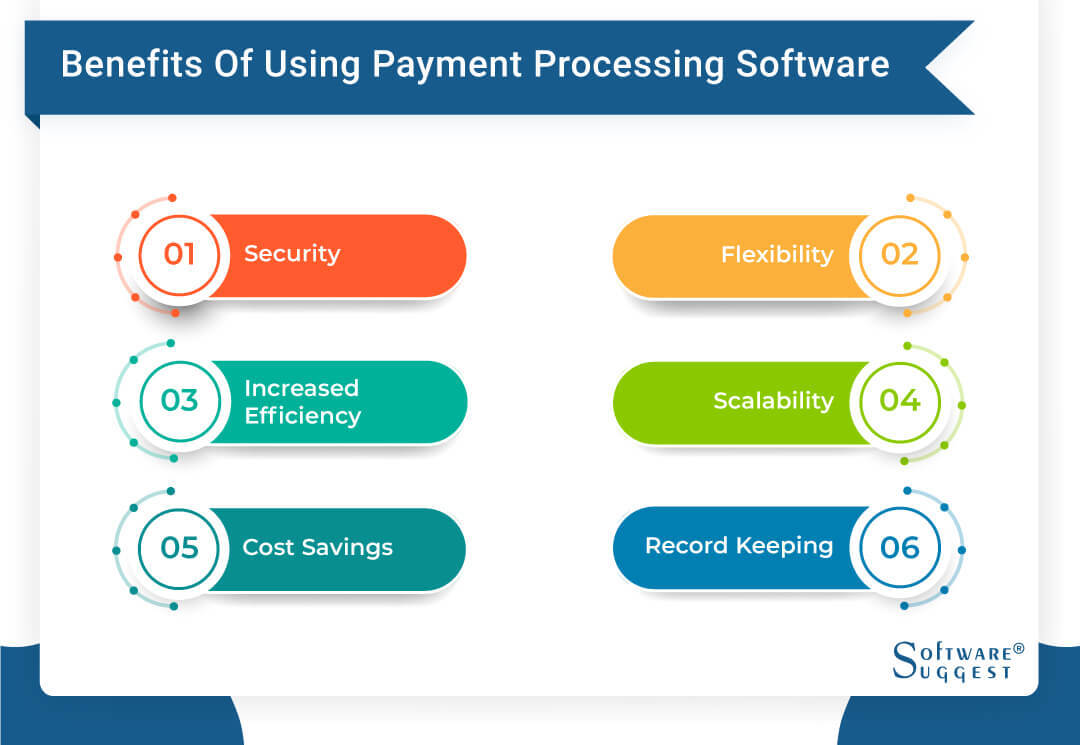
Payment solutions software has been around for decades and is used by businesses of all sizes. Here are some of the benefits of using the software.
-
Security
Payment processing tools use encryption technology to encrypt sensitive customer data during the online transaction process. They also employ several layers of authentication, such as biometric authentication or PIN codes, to confirm a customer’s identity before allowing them to complete their purchase.
-
Flexibility
The software allows you to set up different payment methods tailored to your needs. You can also enable customers to pay with various currencies or even cryptocurrencies like Bitcoin. With these features, you can expand your customer base beyond your local market and accept payments from all over the world.
-
Increased Efficiency
Online payment processing software makes it easy to manage banking information, streamline customer payment options, and design customized invoices that can be processed online. With the software, you can create automated payment options for customers and track customer spending habits in real-time, thus increasing efficiency.
-
Scalability
The system allows you to increase the number of online transactions you can handle without investing in additional hardware or personnel. If demand falls off, you can also reduce your setup without spending money on unneeded resources. .
-
Cost Savings
By automating payments, you can reduce manual labor costs. You also don’t have to worry about purchasing additional software since most payment processing software companies offer a cloud-based system.
What’s more, these solutions often offer discounts on transaction fees, which helps you cut down on overhead costs and maximize profits.
-
Record Keeping
When you use the best payment processing software, you can maintain updated records of your expenses and revenue. The software also generates reports to give you insights into your expenditure trends. With these functions, you’ll be able to create more accurate budgets on where you need to invest or cut costs.
Users of Payment Processing Software
Payment processing software is used by a wide range of user profiles, from small business organizations to large international corporations.
-
eCommerce Businesses
Payment processing is perfect for the eCommerce business. Not only does it speed up the purchase process but also helps ensure customer security. The software encrypts customer data and simplifies the checkout process by allowing customers to make direct payments without entering any extra information or forms.
-
B2B Businesses
Business-to-business (B2B) companies are turning to payment processing solutions because they simplify billing and invoicing processes. With the software, you can automatically notify customers when payment is due, issue receipts, and generate invoices through a drag-and-drop function.
-
Healthcare Providers
Healthcare providers benefit from the use of payment processing software in many ways. It automates patient billing and collections by allowing users to accept credit cards, e-checks, and other forms of payment.
The software also allows patients to make payments online or through an automated phone system without waiting in line or filling out paperwork.
-
Educational Institutions
The best payment software program allows educational institutions to securely accept payments for tuition, fees, or other related expenses. These tools typically feature an automated interface that simplifies the process of collecting payments from students and ensures accuracy when it comes to deposits into the institution's bank account. .
-
Nonprofits
With payment processing software, nonprofit organizations can generate detailed reports on donors and expenses. They can use these reports as evidence when filing taxes or other documents. Additionally, the software comes with fraud detection features, which help protect donors’ information from becoming compromised by malicious actors.
What Are The Features of Payment Processing Software?
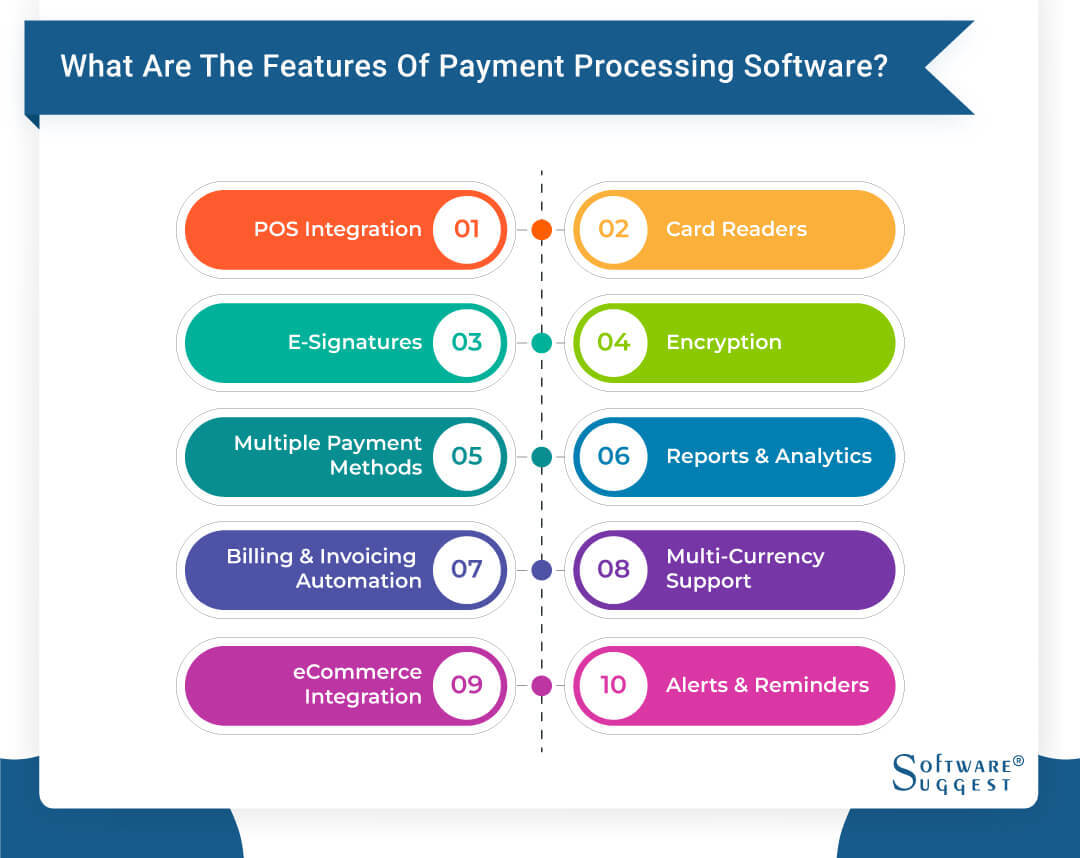
Payment processing systems provide various features that help you streamline your entire payment process.
-
POS Integration
Allows you to accept payments through physical and virtual point of sale (POS) systems, such as a mobile device and traditional credit card terminal. It also eliminates the need for multiple merchant accounts since all online transactions are processed through one account.
-
Card Readers
Enables customers to pay for goods or services with their debit card, credit card, or mobile wallet. The card reader feature can also detect when a customer’s device is placed within proximity.
Once detected, the device can securely transmit data between two points without physically swiping the card—making it easier for customers to pay in-store.
-
E-signatures
Allows you and your customers to sign documents without posting or emailing them. This process also ensures all documents are legally binding by verifying the identity of both parties involved in the transaction. This can be done by using digital certificates or other authentication technologies, such as biometrics, passwords, or PINs.
-
Encryption
Works by transforming plain text data into an unreadable code before sending it over the internet. The encrypted information can only be decoded using a special key or password known only to the sender and receiver of the transaction.
With this feature, you can ensure that third parties are unable to access any sensitive information involved in the payment process.
-
Multiple Payment Methods
Allows you to provide several payment options, such as credit cards, debit cards, Paypal, and Apple Pay. This makes it easy for customers to make purchases without using cash or checks, thus increasing customer satisfaction.
-
Reports and Analytics
With this feature, you can determine how much money you’re making from sales, track the progress of transactions, identify potential problems before they become costly blunders, and get a better understanding of your customers’ spending habits. You can also access transaction histories and monthly spending reports.
-
Billing and Invoicing Automation
Allows you to customize billing cycles. For example, you can set up recurring billing payments so customers can make one-time payments online. You may also schedule automatic reminders for customers who have overdue balances.
-
Multi-Currency Support
This feature provides a simple way to offer international customers more convenient payment methods and reduce frustration when dealing with complex payment processes across different countries. You can also ensure you’re receiving the full amount owed without worrying about changes in exchange rates affecting your profits.
-
eCommerce Integration
Simplifies the entire checkout process by synchronizing customer and payment information from your website into your payment processor’s system. With this feature, customers can complete their purchases using saved payment methods.
The integration also helps reduce fraud by enabling third-party authentication services like Verified by Visa or MasterCard SecureCode to double-check customer identities before approving payments.
-
Alerts and Reminders
Allows you to easily receive notifications about any payments due or overdue and any upcoming bills or services that require payment. You can also automate your alerts each time a new invoice is generated or received.
Considerations In Selecting A Payment Processing Software
When considering what payment processing software to choose, there are a few key things you should take into account.

-
User Interface (UI)
The user interface should be intuitive and straightforward so customers feel confident when entering their details on the checkout page. It should also have a good design with clearly-labeled menus and buttons and an organized layout that makes navigation simple.
-
Ease of Use
A good payment processor will have a streamlined system that allows customers to make contactless payments without any complications. As a merchant, you should also be able to reconcile payments with minimal effort.
-
Cost
When calculating costs for payment processing software, you should compare features and the monthly subscription fee from different providers. You should also read through any contracts carefully before signing anything. Plus, be sure to look at the transaction fees or any hidden charges.
-
Customer Support
Excellent customer support will ensure that customers can access help in case there are any issues with their payments or transactions. It also helps build trust between the customers and your business, enhancing the overall consumer experience.
-
Integrations
An online payment processing system should be able to integrate with other solutions like accounting software, shopping carts, and customer management tools. With this ability, you won’t have to switch to another merchant account provider if you need additional features down the line.
-
Value for Money
When evaluating value for money, look at what types of payments can be processed. You also need to make sure that any chosen system will be compatible with your existing technology. Most importantly, calculate how much it will cost in terms of setup fees, monthly fees, and transaction fees.
-
Compliance with Regulations
Your software must be compliant with PCI, DSS or GDPR. You should be able to protect customer information and adhere to best-practice security protocols when you process payments. Additionally, you must ensure you’re familiar with any local, regional, or global rules that may apply to your business operations.
Top 5 Payment Processing Software with Pricing, Pros & Cons
|
Name
|
Free Trial
|
Demo
|
Pricing
|
Visit
|
|---|---|---|---|---|
|
Amazon Pay |
Yes |
No |
Transaction Based |
Learn More |
|
PayPal |
Yes |
No | Transaction Based |
Learn More |
|
GoCardless |
Yes |
No |
1% on Transaction | |
|
Stripe |
Yes |
No |
1% on Transaction |
Learn More |
|
Square |
Yes |
No |
Custom Pricing Packages |
Learn More |
There are many payment processing software options available in today's market. However, not all of them offer the same level of features and services that meet the needs of every business.
Here are some of the best payment software solutions that you need to know about.
- Amazon Pay: Best for High-Growth eCommerce Companies
- PayPal: Best for Startups and Freelancers
- GoCardless: Best for Accounting and Marketing Professionals
- Stripe: Best for Online Retail Stores
- Square: Best for Small Business Organizations
1. Amazon Pay
Amazon Pay is the best payment processing software for high-growth eCommerce businesses. It offers advanced fraud protection technology. And it provides exclusive discounts and promotions for users.
Key Features
- Debit card payments and credit card processing
- Global payments
- Payment fraud prevention
- Online and mobile payment gateways
Pros
- Fast transaction speed
- Doesn’t have any extra processing fee
- Cash back reward on every payment
Cons
- Limited Amazon Pay wallet features
- It can’t be used as a standalone app—you need to access it via the Amazon app
Pricing
- Amazon Pay’s pricing is transaction-based.
2. PayPal
PayPal is the most popular online payment platform for startups and freelancers. You can use it to pay bills, shop online, or transfer funds on the go. The software also allows the linking of multiple bank accounts and credit cards. Plus, it has fraud detection tools to keep users’ personal information safe at all times.
Key Features
- Access control/permissions
- Anomaly detection and machine learning models
- Customizable invoices
- Marketing reports and promotions management
Pros
- Gives a gift reward to every user
- Ease in depositing and withdrawing money either on the web or app
- Easy integration with other websites
Cons
- IPN and API are sometimes unstable
- Transaction fees can be so high
Pricing
- PayPal’s pricing is charged per transaction. A free plan is available.
3. GoCardless
GoCardless is the most reliable and best payment processing software for financial institutions and marketing professionals. It automates your recurring payment processes. It has direct debit capabilities in multiple countries and currencies. And the platform comes with a user-friendly dashboard.
Key Features
- Electronic and online payments
- Recurring/subscription billing and status tracking
- Multi-currency
- Accounting integration
Pros
- Simple interface with good integrations
- Allows for manually keyed transactions
- Competitive rates compared to other providers
Cons
- Doesn’t integrate with Xero well
- Customer service operates on a European business day
Pricing
- GoCardless offers free and two paid monthly subscription fees—Standard ($60/month) and Pro ($238/month).
- A free trial is available.
4. Stripe
Stripe is the most popular payment gateway for online retail businesses. It’s easy to use. It allows you to accept payments from multiple sources. And the software is also easy to integrate with your existing systems.
Key Features
- Cryptocurrency processing
- Partial payments
- Point of Sale (POS) software
- Self Service Portal
Pros
- Safely stores customer information
- An impressive wallet that allows users to store and exchange money or cryptography
- Works with any other payment collector for online businesses
Cons
- Fees for same-country payments are too high
- Could be very costly if you’re in a business with a high dispute rate
Pricing
- Starts at $0.30 per successful card charge
5. Square
Square is the best payment processing system for small business owners. It has a user-friendly interface. Its pricing model has no hidden fees or long-term contracts. And the system enables you to track sales data and create invoices with ease.
Key Features
- Electronic signature
- Gift card management
- ACH payment processing and in person payments
- Mobile card reader
Pros
- Simple yet meaningful reporting capabilities
- Saves your preferences, easy backup
- Easy to integrate into your website or appointment bookings
Cons
-
The card reader functionality doesn’t work well sometimes
Pricing
- Square's pricing varies. Contact their team for custom pricing packages.
- A free plan is available.
Trends Related to Payment Processing Software
As technology advances, so do the trends related to payment processing software.

-
Cryptocurrency
The user interface should be intuitive and straightforward so customers feel confident when entering their details on the checkout page. It should also have a good design with clearly-labeled menus and buttons and an organized layout that makes navigation simple.
-
Mobile Payments
A good payment processor will have a streamlined system that allows customers to make contactless payments without any complications. As a merchant, you should also be able to reconcile payments with minimal effort.
-
Digital Wallets
When calculating costs for payment processing software, you should compare features and the monthly subscription fee from different providers. You should also read through any contracts carefully before signing anything. Plus, be sure to look at the transaction fees or any hidden charges.
-
Shift toward Subscription-Based Models
Excellent customer support will ensure that customers can access help in case there are any issues with their payments or transactions. It also helps build trust between the customers and your business, enhancing the overall consumer experience.
-
Enhanced Security
An online payment processing system should be able to integrate with other solutions like accounting software, shopping carts, and customer management tools. With this ability, you won’t have to switch to another merchant account provider if you need additional features down the line.
Integration of Payment Processing Software
By integrating payment processing systems with other business-related solutions, you can ensure your customers’ payments are securely processed while improving your overall efficiency.
-
eCommerce Platform
With an eCommerce platform integration, you can quickly receive and process payments from customers within a few minutes. You can also offer multiple payment options, such as PayPal, Apple Pay, and Google Pay.
-
Payment Gateways
This provides a secure connection between merchants and customers, allowing for easy acceptance of online payments. With integrated payment gateways, you can also automate the entire process, from customer checkout to invoicing and reconciliation.
-
Payment Analytics
Integrating payment analytics helps you evaluate customer purchase patterns and understand which payment methods are the most effective at driving revenue. With this information, you can adjust your pricing strategies and marketing campaigns.
-
POS Systems
The integration of POS systems enables you to manage sales transactions, track customer purchases, and store information about promotions or loyalty programs. It also allows you to create customized receipts that contain important information, such as product descriptions, prices, and discounts applied at checkout.
Pricing for Payment Processing Software
Payment solutions can be priced in several different ways. Some solutions offer pay-as-you-go models with no long-term contracts or minimum fees required. Meanwhile, others may include a one-time setup fee plus a flat rate pricing structure or per transaction fee.
Depending on the merchant account provider and product, additional fees, such as PCI compliance fees and merchant account setup costs, might also apply.
Conclusion
Selecting the best payment processing software for your business can be a tricky decision. There’s a range of options to choose from, so you should do your research and find the one that works best for you.
Our buyer’s guide has laid out the key features and considerations when making this choice. Now that you know what to look for, it’s time to start comparing different software packages and make an informed decision.