


Best POS Billing Software
Best POS billing software exists Zoho invoice, myBillBook, GofRUGAL POS, Ginesys, LOGIC ERP, and IVEPOS. The POS billing software is point-of-sales billing software that performs functions every time a sale is made—for example, updating inventory, generating an invoice, maintaining stock, etc.



No Cost Personal Advisor
List of 20 Best POS Billing Software
Category Champions | 2024

Free GST invoicing software for small businesses
Zoho Invoice is a modern and comprehensive retail pos billing software. Using this you can brand your invoices, accept payment in multi-currency, operate at multi[plae places, accept online payments, and so on. Read Zoho Invoice Reviews
Explore various Zoho Invoice features, compare the pricing plans, and unlock the potential of seamless operations by selecting the right software for your business.
Features
View all Zoho Invoice Features- Invoice history
- Online Invoice Payment
- Recurring Invoicing
- Customizable invoices
- Expense Tracking
- Banking Integration
- Payment Processing
- Multiuser Login & Role-based access control
Pricing
Zoho Invoice Caters to
- StartUps
- SMBs
- Agencies
- Enterprises
Category Champions | 2024

Cloud Accounting Software Making Billing Painless
FreshBooks is a revolutionary POS Billing Software. It is cloud-based and helps to manage everything on the go. It helps to manage and prepare invoices, helps in automatic deposits for credit sales, and much more. Read FreshBooks Reviews
Explore various FreshBooks features, compare the pricing plans, and unlock the potential of seamless operations by selecting the right software for your business.
Features
View all FreshBooks Features- Activity Tracking
- Time Tracking
- Invoice Management
- Billing & Invoicing
- Dashboard
- Online Banking Integration
- Expense Tracking
- Receipt Printing
Pricing
FreshBooks Caters to
- StartUps
- SMBs
- Agencies
- Enterprises
Category Champions | 2024

Make a bill in 30 seconds!
Introducing a software solution designed to streamline your point of sale (POS) billing process. With this software, you can effortlessly record sales and customer information, while gaining valuable business insights. Read VPoS Reviews
Explore various VPoS features, compare the pricing plans, and unlock the potential of seamless operations by selecting the right software for your business.
Features
View all VPoS Features- Customer DataBase
- Invoicing
- Quotation & Estimates
- Centralized Syncing
- Returns Management
- Sales Tracking
- Stock Management
- Sales Tax Management
Pricing
1 year Gold - Desktop
$ 56
Per PC
3 year Gold - Desktop
$ 121
Per PC
VPoS Caters to
- StartUps
- SMBs
- Agencies
- Enterprises
Emergents | 2024

Modern Retail POS
Zakya is a modern retail POS software that helps small and medium-sized businesses sell better, manage their entire business, and join the digital revolution in one hour or less. Learn more about Zakya
Explore various Zakya features, compare the pricing plans, and unlock the potential of seamless operations by selecting the right software for your business.
Features
View all Zakya Features- Online Ordering
- Multi-store support
- Cash Drawer Management
- E-commerce integration
- Payment Handling
- Product Management
- Data Security
- Product categorization
Pricing
Standard
$ 9
5 Users/Month Billed Annually
Zakya Caters to
- StartUps
- SMBs
- Agencies
- Enterprises
Category Champions | 2024

The only Digital solution provider to all business
GoFrugal POS is a next-gen point of sale billing software. It helps to make fast bills using the touch screen, tracks inventory, helps you manage everything on laptops & PCs, manage multi-location retail shops, etc. Read GOFRUGAL POS Reviews
Explore various GOFRUGAL POS features, compare the pricing plans, and unlock the potential of seamless operations by selecting the right software for your business.
Features
View all GOFRUGAL POS Features- Purchase
- POS invoicing
- Customer Management
- Tax Management
- Invoice
- 24/7 Support
- Warehouse Management
- GST
GOFRUGAL POS Caters to
- StartUps
- SMBs
- Agencies
- Enterprises
Category Champions | 2024

The Complete Business Management Software for SMEs
Busy Accounting Software is an all-in-one point of sale billing software. It helps in bill generation in multi-currency, manages and monitor sales, monitor procurement activities, manages accounts, and so on. Read Busy Accounting Reviews
Explore various Busy Accounting features, compare the pricing plans, and unlock the potential of seamless operations by selecting the right software for your business.
Pricing
Basic version
$ 100
Per Year
Standard version
$ 188
Per Year
Enterprise version
$ 275
Per Year
Busy Accounting Caters to
- StartUps
- SMBs
- Agencies
- Enterprises
Category Champions | 2024

Making Modern Businesses GST friendly
QuickBooks is a retail pos billing software. It manages and tracks bill status, records all the incomes, can accept payment through credit cards, send payment reminders, accept free bank transfers, etc. Read QuickBooks Online Reviews
Explore various QuickBooks Online features, compare the pricing plans, and unlock the potential of seamless operations by selecting the right software for your business.
Features
View all QuickBooks Online Features- Client Statements
- Collection management
- Inventory Tracking
- Payment Processing
- Invoice Designer
- Customizable invoices
- Project Management
- Taxation Management
Pricing
Simple Start
$ 30
Per Month
Essentials
$ 60
Per Month
Plus
$ 90
Per Month
QuickBooks Online Caters to
- StartUps
- SMBs
- Agencies
- Enterprises
Emergents | 2024

Empowering your business
Saral is a feature-rich touch-enabled POS billing software for retail stores. It helps to manage orders online/ offline, generate reports, manage customer feedback, manage offers & discounts, and so on. Read Saral Billing Reviews
Explore various Saral Billing features, compare the pricing plans, and unlock the potential of seamless operations by selecting the right software for your business.
Features
View all Saral Billing Features- Budgeting
- Investment
- Supplier and Purchase Order Management
- Taxation Management
- Product Database
- Financial Management
- Invoice
- Job Costing
Pricing
Saral Bronze
$ 104
Onetime
Saral Silver
$ 208
Onetime
Saral Billing Caters to
- StartUps
- SMBs
- Agencies
- Enterprises
High Performer | 2024

The best-in-the-industry, Digital-ready POS Software
LOGIC ERP, a One Stop Solution for Retail and POS Billing that enable retailers to attend high rush walk-ins with robust billing, accept payments via various methods with ready plugins for wallets and Payment POS, track their inventory, and pick up promos and customers’ loyalty. Irrespective of which vertical you’re in, Apparel & Fashion, Grocery & FMCG, Pharma, or Specialty Retail, this retail management software can meet your needs and ensure to be part of your growth stories. Read LOGIC ERP- Retail Management Reviews
Explore various LOGIC ERP- Retail Management features, compare the pricing plans, and unlock the potential of seamless operations by selecting the right software for your business.
- Manufacturing Management
- Business intelligence (BI)
- GST & Taxation
- Enterprise Order Management
- Auto Replenishment
- Check & Balance
- Warehouse Management
- Coupon Management
LOGIC ERP- Retail Management Caters to
- StartUps
- SMBs
- Agencies
- Enterprises
Category Champions | 2024

Billing, Accounts and Inventory Management
HDPOS Smart is a point of sale billing software for retail shops in India. It helps in easy GST ready billing & invoicing, printing barcode stickers & managing barcodes, prepares customized invoices, and so on. Read HDPOS Smart Accounts and Billing Reviews
Explore various HDPOS Smart Accounts and Billing features, compare the pricing plans, and unlock the potential of seamless operations by selecting the right software for your business.
- Order Processing
- Online document storage (back-up)
- POS Integration
- Search / Filter
- Document Printing
- Serialized Inventory Tracking
- Reorder Management
- Project Accounting
Pricing
HDPOS smart for single computer
$ 18
Per Month
HDPOS smart for Multiple Terminal
$ 35
Per Month
HDPOS smart on cloud subscription
$ 49
Per Month
HDPOS Smart Accounts and Billing Caters to
- StartUps
- SMBs
- Agencies
- Enterprises
Contenders | 2024

Quick, Bill, Next
Make checkout a smooth experience with Ginesys Billing Software. Accept multiple payment types, manage inventory, promotions, users and item hierarchy simply. Available in web browsers and Android phones and computers. Read Ginesys ERP Reviews
Explore various Ginesys ERP features, compare the pricing plans, and unlock the potential of seamless operations by selecting the right software for your business.
Features
View all Ginesys ERP Features- Payment Gateway Integration
- Purchase
- Multi-Location
- Analytics
- 24/7 Support
- Closing Documents
- Auditing
- Receipt Printing
Ginesys ERP Caters to
- StartUps
- SMBs
- Agencies
- Enterprises
Category Champions | 2024

A complete Retail POS Software for small to big re
Uprow ERP is a simple yet powerful inventory management software to maximize your profits. Manage inventory across multiple outlets with a centralized database, automatically reorder stock, Create variants, Print barcode labels & more. Read Uprow ERP Reviews
Explore various Uprow ERP features, compare the pricing plans, and unlock the potential of seamless operations by selecting the right software for your business.
Features
View all Uprow ERP Features- Stock Taking
- Auto Discount
- Inventory Tracking
- Reorder Management
- eCommerce Management
- Expense Management
- Multi-Store
- Stock Management
Uprow ERP Caters to
- StartUps
- SMBs
- Agencies
- Enterprises
Category Champions | 2024

#1 GST billing software
myBillBook is India's #1 invoicing, GST billing, accounting & inventory management software for small & medium businesses. Grow your business with the best invoicing software. Paid plans start from Rs.34 per month. Read myBillBook Reviews
Explore various myBillBook features, compare the pricing plans, and unlock the potential of seamless operations by selecting the right software for your business.
Features
View all myBillBook Features- Billing Management
- Compensation Management
- Quotation & Estimates
- Accounts payable
- Billing System
- Payment Processing
- Barcode Generation
- Billing Portal
Pricing
Silver Plan
$ 0
Per Month
Diamond Plan
$ 3
Per Month
Platinum Plan
$ 3
Per Month
myBillBook Caters to
- StartUps
- SMBs
- Agencies
- Enterprises
High Performer | 2024

GST Billing software with Inventory & Accounts
Simple Billing software with complete inventory and accounts modules. It's fast, reliable and easy to maintain. Ideal for businesses that have a large number of invoices and deals in 100's of SKU's. Typically used by distributors, retailers and small manufacturers. Read Horizon ERP Reviews
Explore various Horizon ERP features, compare the pricing plans, and unlock the potential of seamless operations by selecting the right software for your business.
Features
View all Horizon ERP Features- GST returns
- Barcoding
- User Activity Monitoring
- Barcode Generation
- Multiuser Login & Role-based access control
- Multi-Company
- Inventory Tracking
- Expense Management
Pricing
SINGLE PC License
$ 192
One Time
THREE PC License
$ 384
One Time
EIGHT PC License
$ 746
One Time
Horizon ERP Caters to
- StartUps
- SMBs
- Agencies
- Enterprises
Contenders | 2024

Breathing life into your Retail business with pran
prana POS is a powerful cloud-based Point of Sale software for retail and F&B businesses worldwide. prna POS is flexible and adaptable. prana POS is a perfect solution for all the mom n pop stores, multi-chain outlets, and enterprises. Read eRetail Cybertech - pranaPOS Reviews
Explore various eRetail Cybertech - pranaPOS features, compare the pricing plans, and unlock the potential of seamless operations by selecting the right software for your business.
- Tax Management
- Returns Management
- Multi Currency
- Barcode Scanning
- Multi-Store Management
- Customer DataBase
- Multi-Language
- Serial Number Tracking
Pricing
CORPORATE
$ 0
Per Month
BASIC
$ 160
Per Year
STANDARD
$ 320
Per Year
eRetail Cybertech - pranaPOS Caters to
- StartUps
- SMBs
- Agencies
- Enterprises
Category Champions | 2024

Integrated with eBusiness Apps & Ready with GST
Marg ERP9+ is a comprehensive POS Billing Software. It helps in credit limit management, audit sales, helps in uploading & downloading invoices, discounts & offers management, etc. Read Marg ERP9+ Billing & Invoicing Software Reviews
Explore various Marg ERP9+ Billing & Invoicing Software features, compare the pricing plans, and unlock the potential of seamless operations by selecting the right software for your business.
- Product Database
- Billing Management
- Mobile App
- Taxation Management
- Expense Management
- Multi Currency
- Invoice Designer
- Banking Integration
Pricing
Basic Edition
$ 113
Full Licence/ Single-User
Silver Edition
$ 175
Full Licence/ Single-User
Gold Edition
$ 350
Full Licence/ Multi-User
Marg ERP9+ Billing & Invoicing Software Caters to
- StartUps
- SMBs
- Agencies
- Enterprises
Category Champions | 2024

IVEPOS Point of Sale - Retail & Restaurant POS
IVEPOS is a cloud-based Point of Sale and business management software for restaurants and retail with 100+ tools for billing, payments, inventory management, customer management, and many more tools. Read IVEPOS Reviews
Explore various IVEPOS features, compare the pricing plans, and unlock the potential of seamless operations by selecting the right software for your business.
Features
View all IVEPOS Features- Employee Management
- POS Transactions
- Channel Management
- Receipt Printing
- Customer Accounts
- Sales Analysis
- Customer Account Profiles
- Point of Sale (POS)
Pricing
IVEPOS
$ 8
Device/Month
IVEPOS Caters to
- StartUps
- SMBs
- Agencies
- Enterprises
Category Champions | 2024
.png)
Power of Simplicity
TallyPrime is India’s leading business management software for GST, accounting, inventory, banking, and payroll. TallyPrime is affordable and is one of the most popular business management software, used by nearly 20 lakh businesses worldwide. Read TallyPrime Reviews
Explore various TallyPrime features, compare the pricing plans, and unlock the potential of seamless operations by selecting the right software for your business.
Features
View all TallyPrime Features- Integrate Different Payment Gateways
- Accounts Receivable
- Accounting Integration
- Invoice
- Multi-Branch Connectivity
- Data Exchange Capabilities
- MIS Reporting Capabilities
- Investment
TallyPrime Caters to
- StartUps
- SMBs
- Agencies
- Enterprises
Emergents | 2024

Best for chain of restaurants and hotels
Romio POS is an intuitive and user-friendly POS billing software. It can handle multiple modes of payments, multiple currencies, promotional offers, muti or sub-category bill generation, and much more. Read ROMIO POS Reviews
Explore various ROMIO POS features, compare the pricing plans, and unlock the potential of seamless operations by selecting the right software for your business.
Features
View all ROMIO POS Features- Data Imports/Exports
- Dashboard
- Accounting Management
- Order Tracking
- Labor Cost Calculator
- Promotions Management
- Warehouse Management
- Supply Chain Management
Pricing
ROMIO POS
$ 347
Per Year
ROMIO POS Caters to
- StartUps
- SMBs
- Agencies
- Enterprises
Contenders | 2024

Simple solutions for your business
QuickBill is one of the best powerful Invoice software for small, mid-size, and large businesses. It has feature provides Inventory Management, Quick Billing, Barcode Design, Financial Accounting, Service Billing, SMS & Email, etc. Read QuickBill Reviews
Explore various QuickBill features, compare the pricing plans, and unlock the potential of seamless operations by selecting the right software for your business.
Features
View all QuickBill Features- Multiuser Login & Role-based access control
- Accounting
- Returns Management
- Hardware Inventory
- Recurring Billing
- Purchasing
- Recurring Invoicing
- Tax Calculator
QuickBill Caters to
- StartUps
- SMBs
- Agencies
- Enterprises
Get Free Expert Advice

Recent Review

In the dynamic world of retail business, having efficient and reliable point-of-sale billing software is essential. POS billing software streamlines the billing and inventory management processes, enhances customer satisfaction, and improves overall business operations.
Choosing the best POS retail software for your company might be difficult, given the variety of options on the market. In this article, we will explore the best POS billing software in India for 2024, its key features, pricing, pros, and cons, and discuss important factors to consider while selecting one.
What Is POS Billing Software?
POS billing software is a computerized system designed to simplify and automate the billing process in retail businesses. It enables businesses to process sales transactions, generate invoices, track inventory, manage customer information, and generate various business reports.
With its advanced features, POS billing software replaces traditional cash registers and improves the efficiency and productivity of retail operations.
How Does POS Billing Software Work?
POS billing software integrates with hardware components such as barcode scanners, receipt printers, cash drawers, and an intuitive software interface. It allows sales staff to scan product barcodes, input quantities, apply discounts, and select payment methods.
The smart billing software then calculates the total bill, generates an invoice, and records the transaction in the system. Real-time inventory updates ensure accurate information on stock availability.
Who Uses POS Billing Software?
Businesses in a range of industries, including retail businesses, restaurant businesses, diners, cafes, supermarkets, boutiques, and more, regularly employ point-of-sale billing software. It caters to businesses of all sizes, from small boutiques to large, retail store chains, and helps them efficiently manage their billing processes.
Whether it's a single-store establishment or a multi-location business, POS billing software is an indispensable tool for managing sales, inventory, and customer data.
Key Benefits of POS Billing System
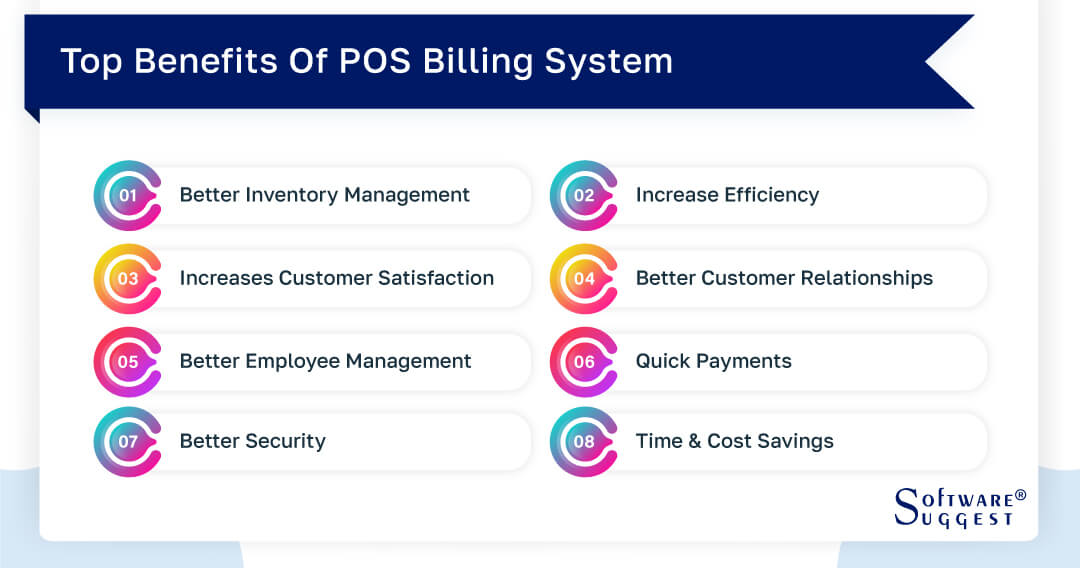
A POS billing system offers several benefits, including improved inventory management, increased customer satisfaction, better customer relationships, streamlined employee management, quick payments, enhanced security, and time and cost savings.
Businesses can use it to streamline operations, deliver effective customer service, and make data-driven decisions that will lead to corporate expansion.
-
Better Inventory Management
POS billing software provides real-time inventory tracking, enabling businesses to monitor stock levels accurately. This helps optimize inventory procurement, reduce stockouts, and prevent overstocking. Automatic reordering based on predefined stock thresholds ensures a smooth supply chain.
-
Increase Efficiency
The POS billing software streamlines the ordering and the stocking process. It also makes the scheduling process easier and quicker. The overall efficiency of the retail store increases with the implementation of the system as it not only manages the cash part but also takes care of the inventory storage.
-
Increases Customer Satisfaction
With a POS billing solution, businesses can provide faster and more often accurate billing, reducing waiting times at the checkout counter. It enables seamless payment options, including online payments, making transactions convenient for customers. Features like customer preferences and purchase history allow businesses to offer personalized services, improving customer satisfaction and loyalty.
-
Better Customer Relationships
POS billing software helps manage customer data efficiently. It stores customer information such as contact details, barcode scanner to print barcode labels, and preferences, enabling businesses to personalize interactions and offer targeted promotions. By understanding customer behavior, businesses can build stronger relationships and provide exceptional customer service.
-
Better Employee Management
POS billing software allows businesses to track employee sales performance, monitor shifts, and manage commissions. It enables effective workforce management, streamlining employee schedules and ensuring efficient staffing. Employee login features also enhance security and accountability in sales transactions.
-
Quick Payments
POS system supports multiple payment options, including credit cards, debit cards, mobile wallets, and online payment gateways. It simplifies the payment process, reduces cash handling errors, and speeds up transactions, resulting in faster customer checkout and improved operational efficiency.
-
Better Security
POS billing software for PC enhances data security by restricting access to authorized personnel only. It protects sensitive business and customer information through user access controls and data encryption. Regular data backups and secure storage minimize the risk of data loss and ensure business continuity.
-
Time and Cost Savings
Online POS billing software automates manual tasks such as free billing software such as calculations, invoice generation, and inventory management. It eliminates the need for paperwork, reduces manual errors, and saves time for both employees and customers. By streamlining operations, businesses can achieve cost savings and allocate resources more efficiently.
Key Features of POS Billing Software
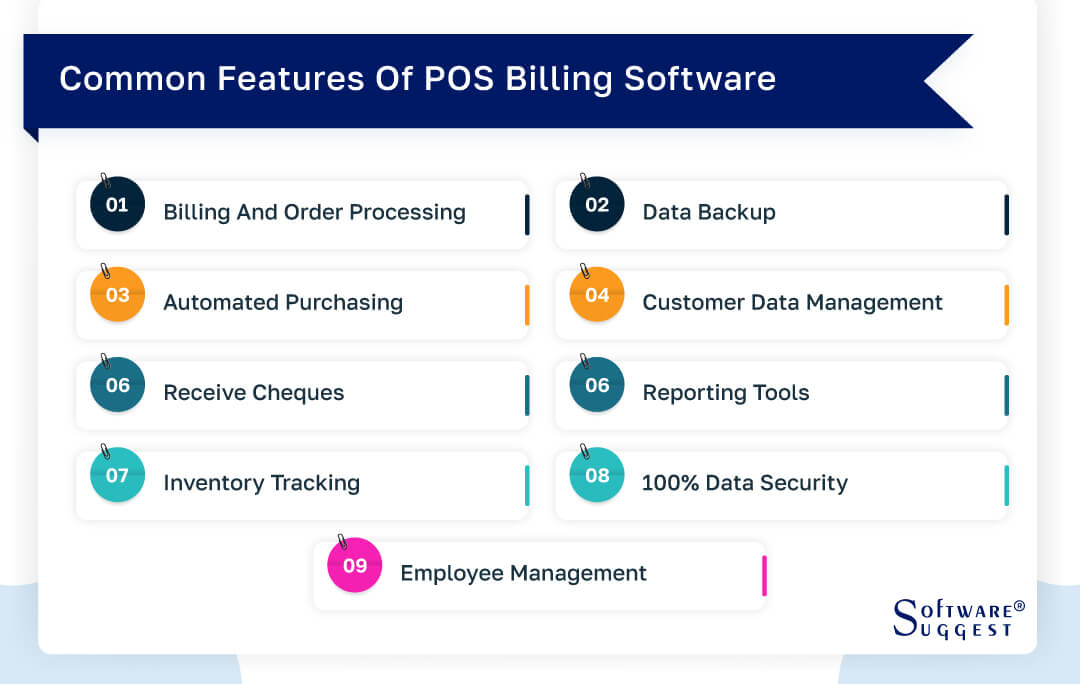
POS billing software offers a range of critical features, including efficient billing and order processing, automated purchasing, data backup, customer data management, reporting tools for business insights, and robust data security measures.
These features streamline business operations, enhance inventory management, improve customer relationships, and provide valuable insights for informed decision-making.
-
Billing and Order Processing
POS software enables quick and accurate billing, with features like a billing app a barcode scanner, automatic price calculation, and a discount application. It streamlines the order processing workflow, generates invoices, and tracks sales transactions.
-
Data Backup
A reliable POS system provides regular data backups to ensure data integrity and protection against system failures or data loss. It safeguards business information and allows for easy data recovery if required.
-
Automated Purchasing
Advanced retail POS billing software offers automated purchasing capabilities, allowing businesses to set reorder points, create purchase orders, accept online payments, and manage supplier information. It streamlines the procurement process and ensures timely replenishment of inventory.
-
Customer Data Management
POS software stores and manages customer data, including contact details, purchase history, and preferences. It enables businesses to track customer behavior, personalize interactions, and offer targeted promotions.
-
Receive Cheques
Some POS software solutions support cheque payments by providing features for cheque scanning, verification, and management. It simplifies the handling of cheque transactions and reduces manual effort.
-
Reporting Tools
POS software generates various reports, such as sales reports, inventory reports, and financial reports. These reports provide insights into business performance, sales trends, and inventory status, helping in making informed decisions.
-
Inventory Tracking
The POS billing software keeps a record of the inventory and notifies when the inventory is out of stock. It also notifies of the expiry of items with limited shelf life. This saves the bottom line and prevents inventory shrinkage by updating the products in the store.
-
100% Data Security
POS software ensures data security through features like user access controls, data encryption, and secure storage. It protects sensitive business and customer information from unauthorized access or data breaches.
-
Employee Management
With employee being on record, POS billing software also provides data on the active time of an employee and optimize productivity by keeping track of when and what your employees are up to.
How to Choose the Best POS Billing Software?
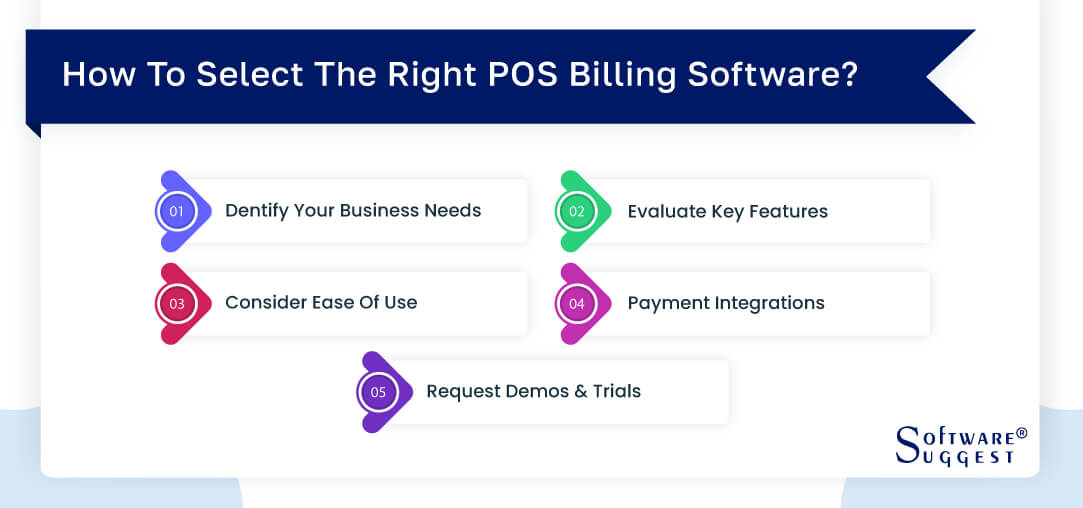
To choose the best POS software, businesses, and retail shops should identify their specific needs, evaluate key features such as billing, inventory management, and reporting tools, consider ease of use and payment integrations, and request demos or trials from software vendors.
Various businesses need POS billing for the restaurant business, there is restaurant system management, and for SMEs there is Billing and Invoicing POS. This ensures selecting a solution that aligns with their business requirements and enhances operational efficiency.
-
Identify Your Business Needs
Evaluate your business size, industry, and specific requirements. Consider factors such as the number of stores or locations, inventory volume, and integration with other business systems.
-
Evaluate Key Features
Assess the key features offered by different retail POS system billing software options. Look for features like billing and order processing, inventory management, customer relationship management, reporting tools, and integrations with other business systems.
-
Consider Ease Of Use
Choose a free POS billing software with an intuitive and user-friendly interface. It should be easy for your staff to learn and operate, reducing training time and minimizing errors during transactions.
-
Payment Integrations
Ensure that the POS billing software integrates with popular payment gateways and supports multiple payment options. This enables seamless payment processing and enhances the convenience of your customers.
-
Request Demos and Trials
Before making a final decision, request demos or trials from software vendors. This allows you to test the software's functionality, user-friendliness, and compatibility with your business processes.
Top 5 POS Billing Software Comparison
|
Name
|
Free Trial
|
Demo
|
Pricing
|
|---|---|---|---|
| 14 Days |
Yes |
Free to use | |
|
15 Days |
Yes | Rs. 2799/month | |
|
14 Days |
Yes |
Rs. 14,160/year | |
| 30 Days |
Yes |
Rs. 2799/month | |
|
14 Days to 90 Days |
Yes |
Rs. 1,994/month |
The top 5 POS billing software that is revolutionizing retail management software are Paytm, Vyapar, Just Billing, QuickBooks Online, and Shopify POS. They offer robust features and seamless integration to streamline your business operations.
1. Paytm
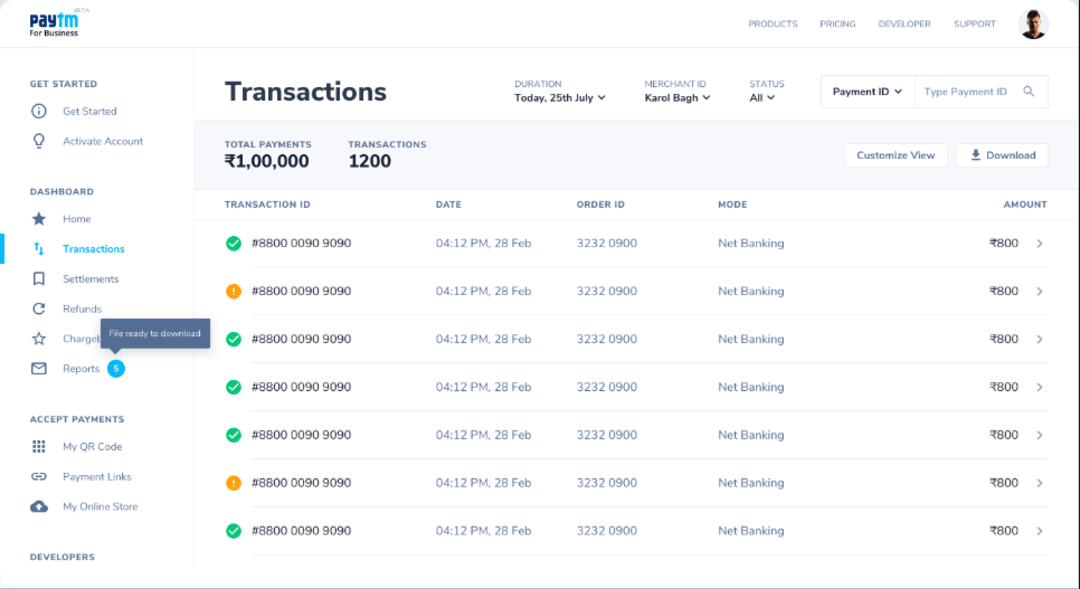
Paytm is a popular POS billing software in India that offers online and offline billing, inventory management, customer management, and seamless integration with the Paytm payment gateway. With its user-friendly interface and multiple payment options, the Paytm billing software simplifies the billing process and provides a convenient solution for businesses of all sizes.
- Insurance and investment
- Bill payments and recharges
- Different payment options
- Paytm payments banks
- Online shopping
- Paytm provides a convenient and user-friendly platform for digital payments.
- Paytm enables users to make quick and instant transactions.
- Paytm offers additional financial services, such as savings accounts, credit services, insurance, and investment options.
- Paytm imposes limits on cash withdrawals from its wallet to a bank account.
- The digital payment landscape is subject to regulatory changes, and new regulations or policies could impact Paytm's operations or services.
- Paytm may charge transaction fees for certain services or transactions, such as transferring funds from Paytm Wallet to a bank account.
Pricing
-
Paytm does not charge anything from users.
2. Vyapar
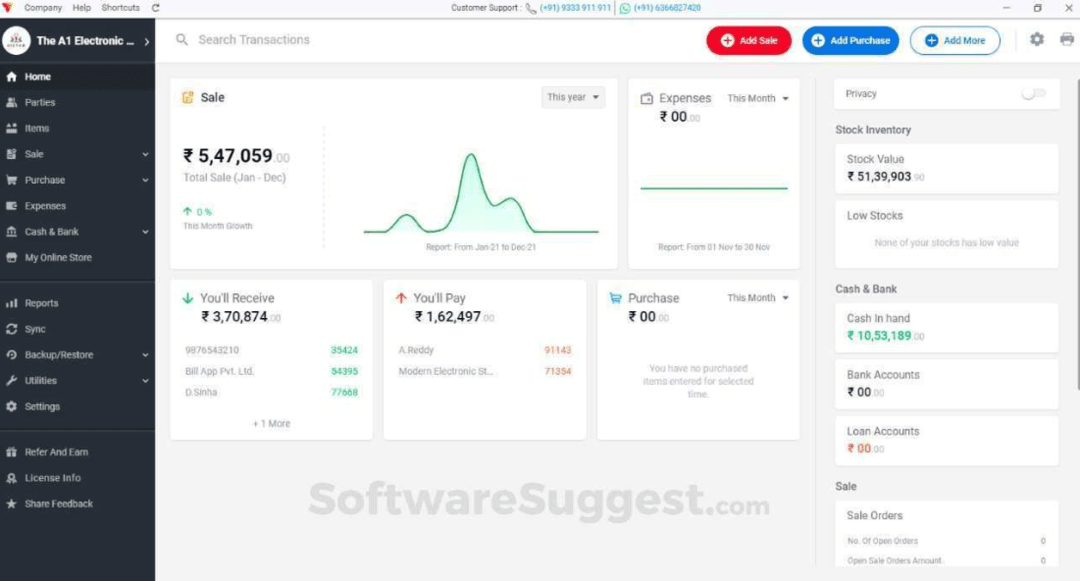
Vyapar is a popular GST billing software in India that offers invoicing, inventory management, accounting, and GST compliance features. With its easy-to-use interface and offline mode availability, Vyapar is suitable for small businesses. However, its limited scalability and basic reporting capabilities might be a drawback for larger enterprises.
- Invoicing and billing
- Inventory management
- Financial accounting
- GST compliance
- Business analytics and reports
- Vyapar simplifies business operations by providing a comprehensive set of features for invoicing, billing, inventory management, and accounting.
- Vyapar offers robust financial management features, including expense tracking, profit and loss statements, balance sheets, and bank reconciliation.
- Vyapar provides various reports and analytics to gain insights into business performance.
- Vyapar offers a mobile app, but it has limitations when it comes to offline functionality.
- Vyapar provides basic accounting functionality, but it may lack some advanced features required by certain businesses.
- Some users have reported challenges in getting timely customer support or finding comprehensive documentation for Vyapar.
Pricing
It has two pricing plans:
- Silver plan- Rs. 2799 per month
- Gold plan- Rs. 3499 per month
3. JustBilling
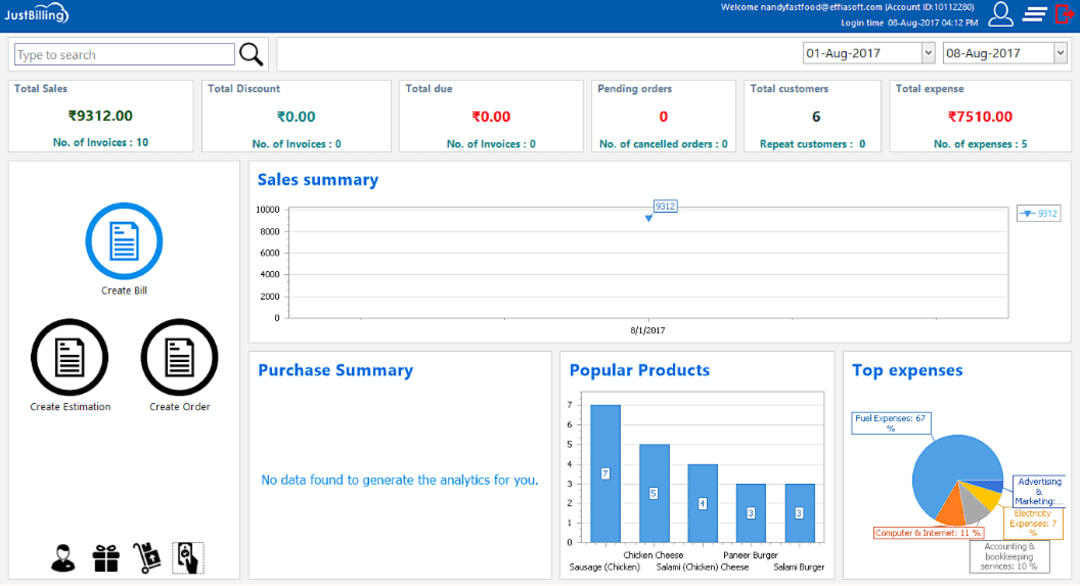
JustBilling is a point-of-sale software and billing software that offers customizable invoices, seamless integration with popular payment gateways, and cloud-based accessibility. It provides efficient billing and inventory management solutions for businesses, although it has limited integrations with other business systems and lacks a dedicated mobile app.
- Cloud-based and mobile support
- Reporting and analytics
- Customer relationship management (CRM)
- Multi-location support
- Offline mode
- JustBilling provides a wide range of features that cater to the needs of businesses, including billing, invoicing, inventory management, purchase order management, and point of sale capabilities.
- JustBilling allows users to customize their invoices, bills, and receipts with their company logo, branding elements, and personalized information.
- JustBilling offers robust inventory management features, enabling businesses to track stock levels, set reorder points, and receive low-stock alerts.
- While JustBilling offers a range of features, it may have limitations when it comes to integrating with other software or systems.
- JustBilling provides basic accounting functionality, but it may lack some advanced features that certain businesses might require.
- While JustBilling allows the customization of invoices and bills with company branding, the level of customization options may be limited.
Pricing
The pricing (Yearly) varies from different categories:
- Retail professional: Rs. 14,160 per year (Windows, Android, and IOS)
- Restaurant professional: Rs. 14,160 per year (Windows and Android)
- Distribution professional: Rs. 14,160 per year (Windows and Android)
- Service professional: Rs. 14,160 per year (Windows and Android)
4. QuickBooks Online
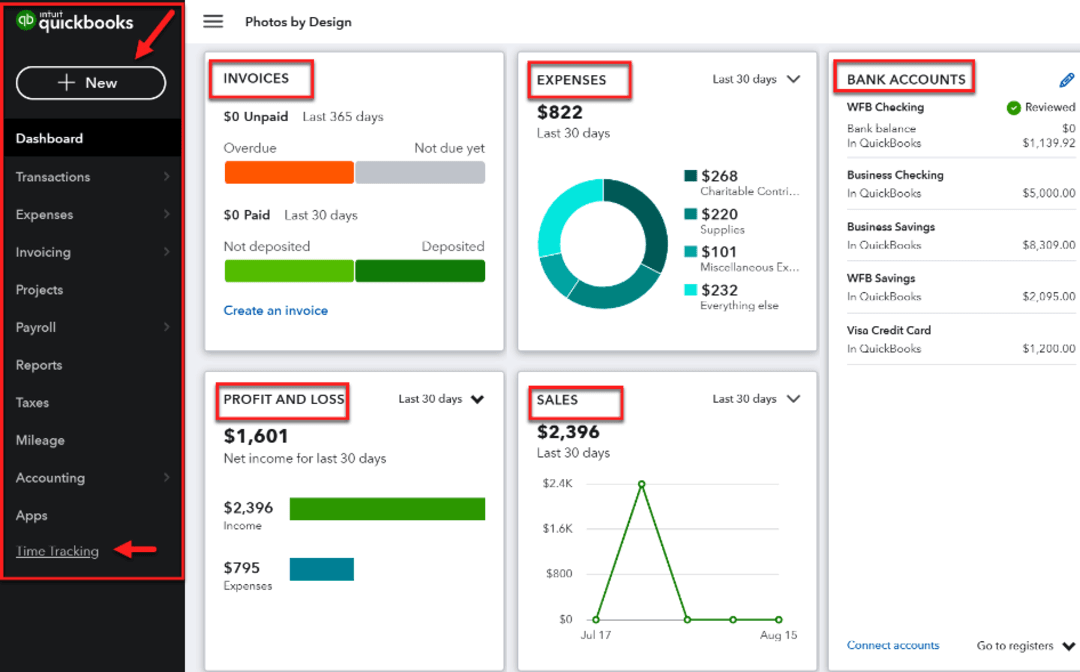
QuickBooks Online is a comprehensive free POS software and billing software that offers invoicing, accounting, inventory management, and tax calculation features. With seamless integration with other QuickBooks products and a user-friendly interface, it is a popular choice for businesses looking for robust accounting capabilities and mobile accessibility.
- Mobile accessibility
- Third-party integrations
- Multi-user collaboration
- Data security
- Financial reporting
- QuickBooks Online is a cloud-based accounting software, that allows users to access their financial data from anywhere with an internet connection.
- QuickBooks Online has a user-friendly interface and intuitive setup process.
- QuickBooks Online automates various accounting tasks, saving businesses time and reducing the risk of manual errors.
- The basic plans of QuickBooks Online may have limitations in terms of inventory management capabilities.
- QuickBooks Online follows a subscription-based pricing model, which means businesses need to pay recurring monthly or annual fees to access and use the software.
- While QuickBooks Online offers a range of features, customization options may be limited compared to desktop versions of the software.
Pricing
It has two pricing plans:
- Silver plan- Rs. 2799 per month
- Gold plan- Rs. 3499 per month
5. Shopify POS
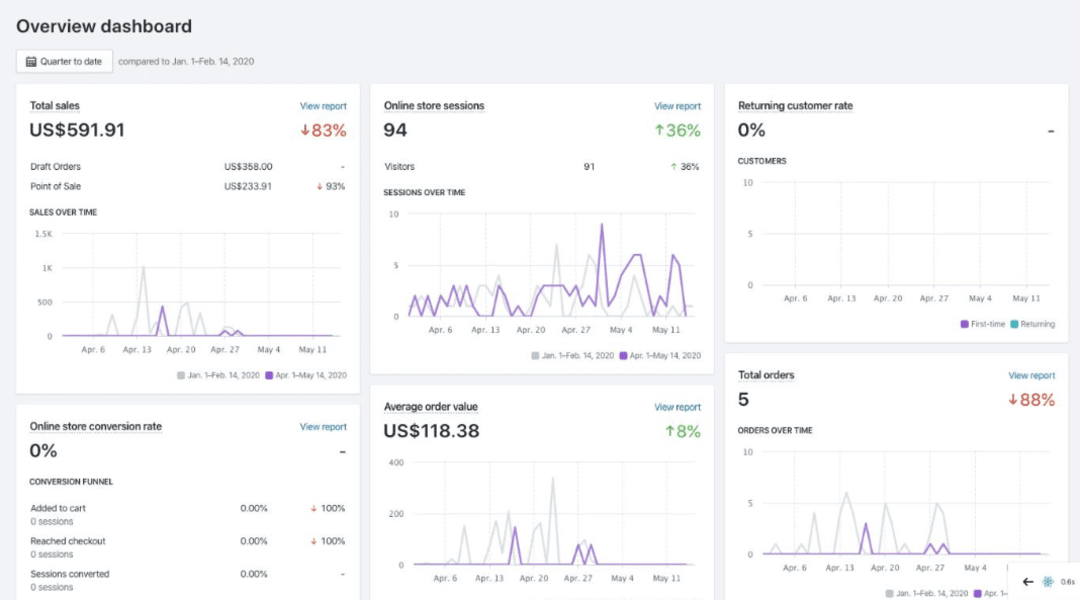
Shopify POS is a powerful retail POS software that seamlessly integrates with the Shopify eCommerce platform. With comprehensive inventory management, online and offline sales capabilities, and mobile app support, Shopify the POS app provides a user-friendly interface and helps businesses manage their retail operations efficiently.
- Mobile and in-store checkout
- Product catalog and variants
- Customizable discounts and promotions
- Integrated payment processing
- Reporting and analytics
- Shopify POS offers robust reporting tools that provide businesses with valuable insights into sales performance, inventory turnover, and customer behavior.
- Shopify provides 24/7 customer support to assist businesses with any technical or operational issues they may encounter.
- Shopify POS offers a vast selection of third-party app integrations through the Shopify App Store.
- While Shopify POS integrates seamlessly with the Shopify eCommerce platform, it may have limitations when integrating with non-Shopify platforms or software.
- While Shopify POS offers an offline mode, its functionality is limited compared to the online mode.
- While the basic features of Shopify POS are user-friendly, more advanced features may have a steeper learning curve.
Pricing
It has three pricing plans:
- Basic plan- Rs. 1,994/Month
- Shopify plan- Rs. 7,447/Month
- Advanced plan- Rs. 30,164/Month
Challenges Faced While Using POS Billing System
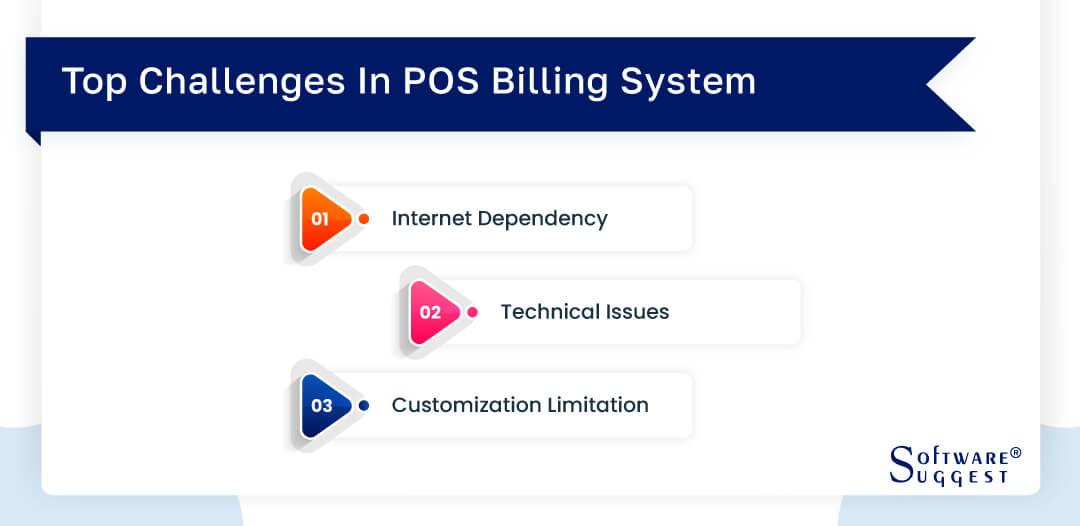
While using a POS billing system, retailers may face certain challenges. It is crucial to choose the best retail POS billing app software that meets specific requirements. Installation of the POS software and its integration with existing systems can be complex.
-
Internet Dependency
POS system heavily relies on internet connectivity for real-time updates and payment processing. Poor internet connectivity or outages can disrupt business operations.
-
Technical Issues
Like any software system, a POS system may encounter technical glitches, software updates, or hardware compatibility issues. These issues can temporarily impact billing processes and require prompt technical support.
-
Customization Limitation
Some POS system solutions have limitations when it comes to customization options. Businesses with unique workflows or specific requirements may find it challenging to tailor the software to their exact needs.
Market Trends in POS Billing Software
The market trends in Point of sale billing software showcase a growing demand for the best POS software in India. Businesses seek advanced solutions like a robust install POS software and billing system to streamline their operations.
With features like online invoicing and pos invoice software, the market is witnessing an increased adoption of point-of-sale billing software for efficient and seamless billing processes.
-
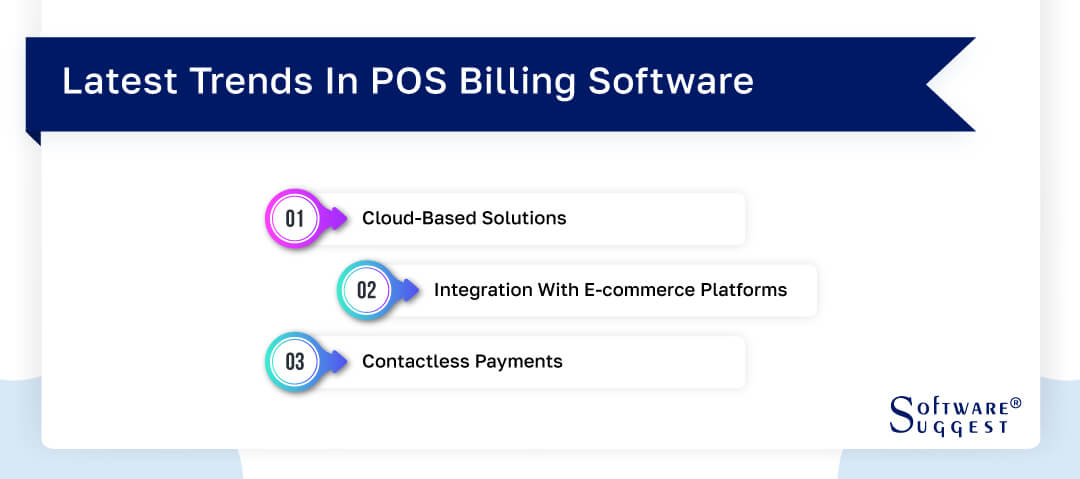
Cloud-Based Solutions
Cloud-based Point of sale software and billing software solutions is gaining popularity due to their accessibility, scalability, and cost-effectiveness. They provide real-time data synchronization, easy software updates, and remote accessibility.
-
Integration With E-commerce Platforms
As businesses expand their online presence, integration between POS software and eCommerce platforms becomes crucial. This allows seamless synchronization of inventory, orders, and customer data across both online and offline channels.
-
Contactless Payments
The COVID-19 pandemic has accelerated the adoption of contactless payment methods. Retail and POS systems and billing software with integrated contactless payment options, such as QR code payments and digital wallets, help businesses offer safer and more convenient payment options to customers.
With the ever-increasing queue at retail stores, the need is to make the process faster and more automated. Having implemented POS billing software helps stores in the faster billing process and better customer record storage. The advanced cloud-based POS billing system can be accessed even. With the listed features above, the POS billing system if implemented full-fledged, helps automate the system, cut down on manual tasks, and produce efficient results for the business with higher customer satisfaction.
Conclusion
Choosing the right retail POS billing software is vital for the success of retail businesses in India. The 20 best POS billing software options discussed in this article offer a range of features and pricing options to suit different business needs.
By considering key factors such as business requirements, ease of use, and integration capabilities, businesses can select a reliable and efficient POS billing software solution.
Embracing the latest market trends, such as cloud-based solutions and contactless payments, will ensure that businesses stay competitive and meet the evolving needs of customers in the dynamic retail landscape.
Related Research Articles
FAQs
The cost of POS for billing can vary depending on factors such as features, scalability, and the specific needs of the business. There are various pricing models available, including one-time purchases, monthly subscriptions, and usage-based pricing.
For businesses in India looking for the best POS billing software, there are several options available at different price points. The average cost for the software can vary from a basic plan of INR 2000 per month to an advanced plan of INR 30,000 per month. These include both local and international software providers offering solutions tailored to the Indian market.
It's essential to consider factors such as the size of the business, the number of stores, and the desired features when evaluating the cost of POS billing software.
Yes, modern POS billing software is designed to handle different payment methods effectively. Whether it's cash, credit cards, debit cards, mobile wallets, or online payments, the best POS billing software in India provides a comprehensive solution for processing various payment methods.
A robust POS billing system ensures seamless integration with different payment gateways, allowing businesses to accept payments securely and efficiently. It enables businesses to process transactions at the point of sale, whether it's in a retail store, restaurant, or online store.
POS billing software is highly scalable and caters to businesses of different sizes across various industries. Whether it's a small retail shop, a bustling restaurant, or a large chain of stores, the best POS billing software in India provides a flexible and robust solution.
The software's scalability is evident in its ability to adapt to the unique needs of businesses. From small businesses with limited sales volume to large enterprises with multiple stores, a POS billing system offers features that can be tailored to suit the specific requirements of each business type.
It can efficiently handle high transaction volumes and manage inventory across multiple locations, ensuring seamless operations for retail businesses of all sizes.