



SlideDrift
Do you work at SlideDrift? Upgrade your plan to access the full benefits of SoftwareSuggest, and collect more reviews through marketing campaigns.
SlideDrift Reviews & Product Details
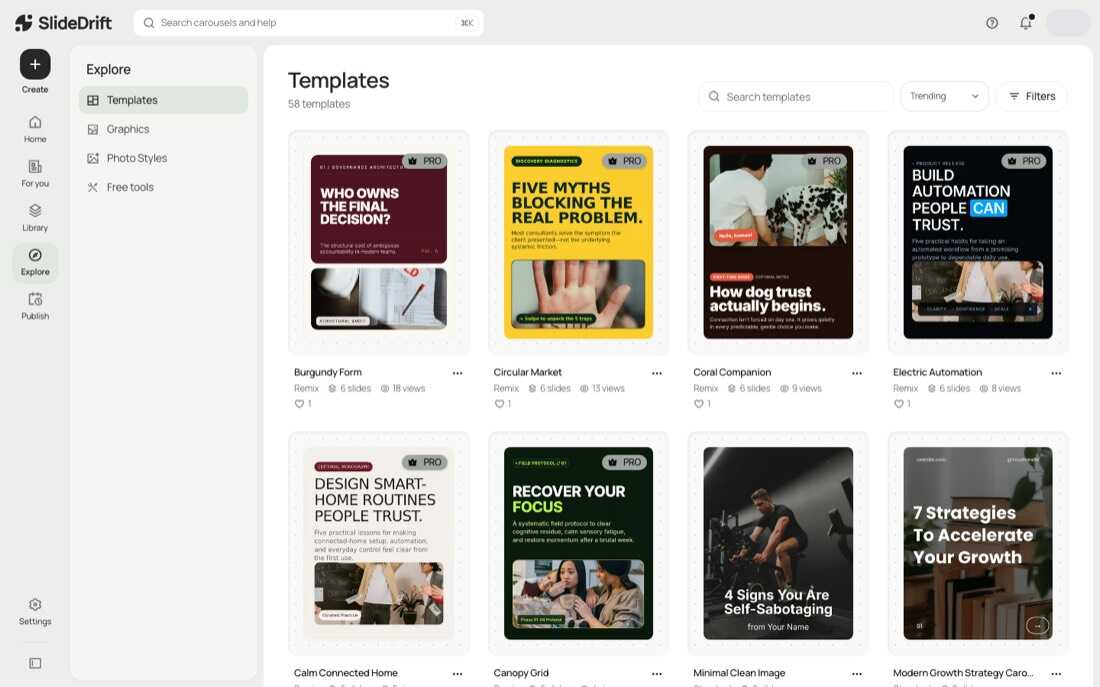
SlideDrift is an AI LinkedIn carousel maker that helps professionals create social media posts from any idea, notes, or website link. SlideDrift provides AI-assisted drafting, slide editing, templates, brand styling, and export options for PDF and PNG carousel posts.
SlideDrift Starting Price
$29/Per Month

Become A Software Superstar
Want your award displayed on your SoftwareSuggest profile? Apply below.
Key Features of SlideDrift
Here are the powerful features that make SlideDrift stand out from the competition. Packed with innovative tools and advanced functionalities, this software offers a range of benefits.
- Personalization Builder
- Content Builder
- Marketing Automation
- Content Marketing
- Responsive Design
- Social Marketing
- Social Media
SlideDrift Photos and Videos
Alternatives of SlideDrift
Explore alternative software options that can fulfill similar requirements as SlideDrift. Evaluate their features, pricing, and user feedback to find the perfect fit for your needs.
SlideDrift Pricing
Here are the pricing plans for SlideDrift. Choose the plan that best fits your requirements and budget. Get Detailed SlideDrift pricing as per your requirements.
- Post to your LinkedIn profile
- 1 Brand Kit
- Schedule posts to LinkedIn
- PDF and PNG export
- 1,000 credits a month
- Everything in Starter
- 3 LinkedIn accounts, Company Pages included
- 5 Brand Kits
- 25 saved custom templates
- 5,000 credits a month
The pricing information for SlideDrift is sourced either directly from the software provider or publicly available materials. To get the most accurate and up-to-date costs, we advise reaching out to the vendor.
The pricing information was last updated on 18th October 2026.
Free Trial is available for 7 days
SlideDrift Specifications
Get a closer look at the technical specifications and system requirements for SlideDrift. Find out if it's compatible with your operating system and other software.
SlideDrift Description
Here's the comprehensive description of SlideDrift. Gain a brief understanding of its unique features and exceptional benefits.
SlideDrift is a carousel creation software for LinkedIn content workflows. It helps founders, marketers, consultants, agencies, and small teams prepare carousel posts from rough ideas, notes, outlines, or source URLs.
The software creates an initial carousel draft and then lets users edit the slides visually. Users can adjust copy, change the slide structure, apply templates, use brand styling, and prepare the final post for export. Finished carousels can be downloaded as PDF or PNG files for publishing on LinkedIn.
SlideDrift is useful for teams that regularly publish educational, promotional, or thought-leadership content and want to reduce the time spent turning raw material into a formatted carousel post.
It's the fastest way to go from an idea to a professional designed carousel that's ready to post.
SlideDrift Reviews (0)
No reviews yet. Rate this app or be the first to review.
Write a ReviewSlideDrift FAQs
What can I turn into LinkedIn posts?
Notes, an article, a link to a web page or a PDF. A few bullet points or a single idea is enough. SlideDrift drafts carousels, graphics and text posts from it, in your brand.
Do I need any design experience?
No. Pick a design and SlideDrift applies your Brand Kit colours, fonts and logo for you. Every word and slide stays editable if you want to change something.
How is this different from Canva?
Canva is a design tool: you write the copy and lay out each slide yourself. SlideDrift drafts the post from what you know, designs it in your brand, and schedules it to LinkedIn from the same place.
Can I edit a post after it is drafted?
Yes. Every post opens in the editor, where you can change the text, images, slide order and design. Pip, the built-in helper, can also make changes by chat.
What is a Brand Kit?
Your colours, fonts and logo, saved once. SlideDrift uses it for every post. Starter includes 1 Brand Kit, Pro 5 and Agency 25, so agencies can keep each client brand separate.
Can I schedule and publish to LinkedIn?
Yes. Paid plans schedule and publish to your LinkedIn profile, and Pro and Agency also post to Company Pages. Agencies can send a client an approval link before a post goes out.
Is there a free plan?
Yes. The free plan lets you try SlideDrift without a card. You can also try any paid plan free for 7 days.
Connect with SoftwareSuggest experts to get the best quote for your business.




FTC Disclosure SoftwareSuggest may receive compensation from some vendors featured on this page. This does not influence our editorial evaluation or ratings.