


SysTools Split PST
What is SysTools Split PST?
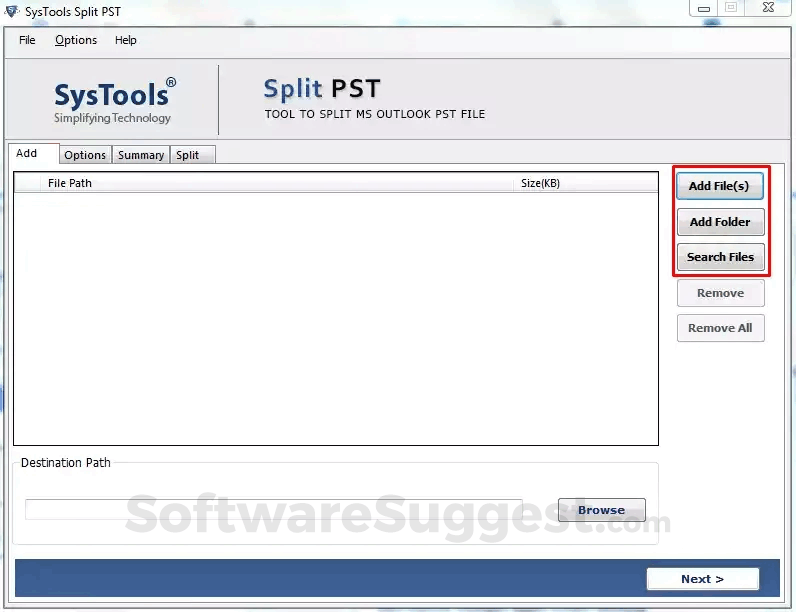
The Split PST tool is capable of performing splitting on new and Archive PST files. This tool can break all the PST data items like emails, contacts, calendars, tasks, etc. The splitter tool can divide both Unicode and ANSI PST files without any file size limitation.
SysTools Split PST Starting Price
$ 56/Onetime

Our Awards and Recognition
Talk with a software expert for free. Get a list of software that's great for you in less than 10 minutes.
SysTools Split PST Screenshots
Key Features of SysTools Split PST
Here are the powerful features that make SysTools Split PST stand out from the competition. Packed with innovative tools and advanced functionalities, this software offers a range of benefits.
- Event Logs
- Remote Access
- Active Directory management
- Asset Management
- Backup and Recovery
- Change Management
- Cloud management
- Configuration Management
- Data Encryption
- Database management
- Disaster recovery planning
- Endpoint protection
- Firewall management
- Help desk ticketing
- Incident Management
- IT Management
SysTools Split PST Pricing
Here are the pricing plans for SysTools Split PST. Choose the plan that best fits your requirements and budget. Get Detailed SysTools Split PST pricing as per your requirements.
- Split Large PST file into smaller parts by, date, size, folder, year, email
- Capable of splitting Both Unicode and ANSI PST files
- Performs splitting on newly created as well as Archive PST file
- No file size limitation for splitting with this tool
- This tool provides an option to split all items like contacts, emails, calendars, etc.
SysTools Split PST Specifications
Get a closer look at the technical specifications and system requirements for SysTools Split PST. Find out if it's compatible with your operating system and other software.
SysTools Split PST Description
Here's the comprehensive description of SysTools Split PST. Gain a brief understanding of its unique features and exceptional benefits.
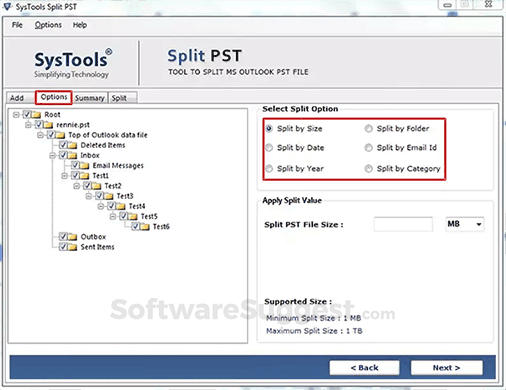
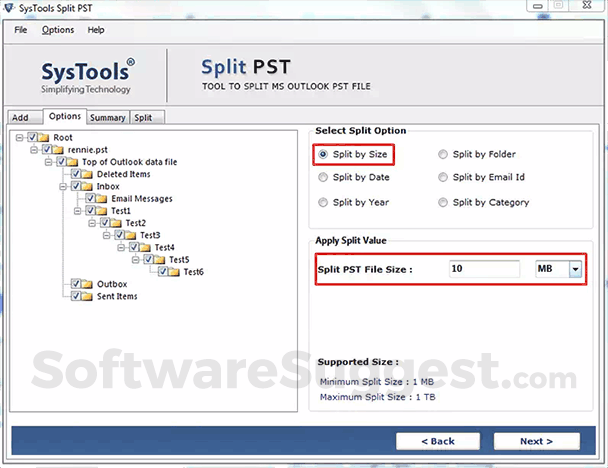
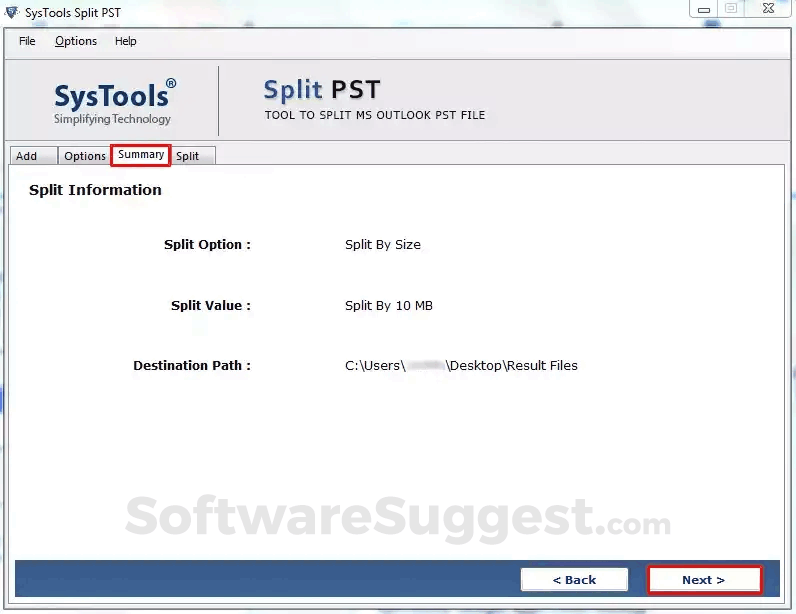
With the split PST tool, oversized Outlook files can be cut into smaller parts. This software is efficient in splitting newly created and Archive PST files. This tool has four different splitting options: Divide PST by Size, Divide PST by folder, Divide PST by date range, Divide PST by year, Divide PST by Email Id. Using this application, one can divide all the Outlook data files items like Emails, tasks, contacts, calendars, etc. This application can split both Unicode and ANSI PST files without any data loss. There is no file size limitation for performing splitting with this tool. This tool is capable of keeping the meta properties and the formatting of the data intact. After the splitting process is completed, the software generates a log report to compare the PST files after and before splitting and it saves a complete comparison report as CSV. In this software, new folders to save the newly created PST files after splitting. Users can save the PST file after splitting to any location of their choice. The CSV file report will also get saved at this location by default after splitting. When users choose the splitting option, at the same time they are required to choose the MS Outlook version they are using. The PST Splitter tool supports, all Outlook versions. If the MS Outlook version is specified by the user, then the software will automatically detect the format of the Outlook PST data file. Moreover, the software can also split PST without Outlook installation.
SysTools Split PST Videos
SysTools Split PST Reviews (0)
No reviews yet. Rate this app or be the first to review.
Write a ReviewAlternatives of SysTools Split PST
Explore alternative software options that can fulfill similar requirements as SysTools Split PST. Evaluate their features, pricing, and user feedback to find the perfect fit for your needs.
SysTools Split PST FAQs
How much does SysTools Split PST cost?
The starting price of SysTools Split PST is ₹ 4050/Onetime. It has different pricing plans:
- Single User : ₹ 4050/Onetime
SysTools Split PST also provides a free trial to users.
What type of customer support is available from SysTools Split PST?
The available support which SysTools Split PST provides is:
- Live support
Where is the headquarters/company of SysTools Split PST located?
The headquarters/company of SysTools Split PST is located at Dwarka.