



Wizcabin
What is Wizcabin?
Revolutionary automated course authoring software to create eLearning courses from documents. Save 70% time in eLearning development through eLearning automation. Create device ready interactive eLearning in minutes.
Wizcabin Starting Price

Our Awards and Recognition
Talk with a software expert for free. Get a list of software that's great for you in less than 10 minutes.
Key Features of Wizcabin
Here are the powerful features that make Wizcabin stand out from the competition. Packed with innovative tools and advanced functionalities, this software offers a range of benefits.
- 360 Degree Feedback
- Academic / Education
- Access Request Management
- Accessibility
- Account Management
- Accounts payable
- Action Management
- Activity / News Feed
- Activity Log
- Activity Monitoring
- Activity Registration
- Ad-Hoc Reporting
- Adaptive Learning
- Admissions Management
- Advertising Management
- AICC / SCORM Compliant
- Ad hoc Analysis
- Ad Hoc Reports
- Admissions Management
- Alumni Management
- Applicant Management
- Applicant Portal
- Application Management
- Assessment
- Assessment Management
- Auto-Formatting Manuscripts
- Automatic Citation Numbering
- Budgeting & Forecasting
- Candidate Management
- Certification Tracking
- Collaboration
- Colleges / Universities
Wizcabin Screenshots
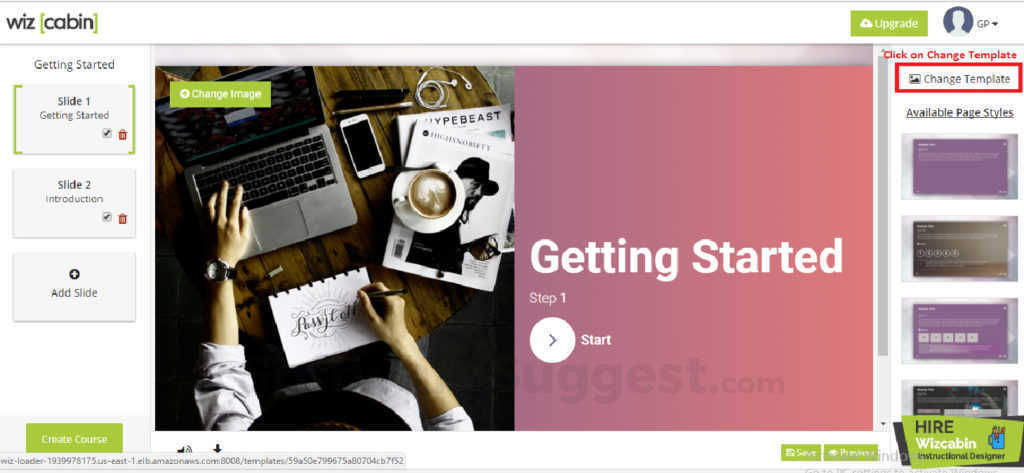
Wizcabin Specifications
Get a closer look at the technical specifications and system requirements for Wizcabin. Find out if it's compatible with your operating system and other software.
Wizcabin Description
Here's the comprehensive description of Wizcabin. Gain a brief understanding of its unique features and exceptional benefits.
Wizcabin is a revolutionary authoring platform that brings downtime to develop interactive eLearning courses from weeks to a few hours! Create amazing online Learning experiences without spending long hours on eLearning production process.
Just upload the storyboard and your course is ready!
With Wizcabin you don’t require any special skills to create beautiful eLearning courses. Create the content, and upload it to Wizcabin – the course is ready.
That means you can now channelize your time and money to more important things, like creating a foolproof learning strategy.
Wizcabin Videos
Overall Wizcabin Reviews
Thinking about using Wizcabin? Check out verified user reviews & ratings based on Wizcabin's features, user-friendliness, customer support, and other factors that contribute to its overall appeal.
Wizcabin Pros and Cons
"Absolutely easy to use. No training or design skills required. You just need to upload the content and choose what you want to do with the content, the software automatically creates awesome courses in minutes. Absolutely easy to use and loads of features"
"Nothing for me. I would suggest more free images in asset library."
1 Wizcabin Reviews
Hear directly from customers who have used Wizcabin. Read their experiences, feedback, and ratings to gain valuable insights into how this software has benefited their businesses.
Aron
Director of Learning
Used the software for : Less than 6 months
Company Size :51-200 employees
Simple and incredible tool to create eLearning courses
This is the tool I was looking for. I started with a free trial, now we have a corporate license with 4 users, using it in our department. I would recommend Wizcabin for L&D teams and also for individuals. I can download it directly to my LMS. Far better than the usual eLearning authoring tools. If you want to make beautiful courses but save money I would highly recommend Wizcabin!
What do you like best about Wizcabin?
Absolutely easy to use. No training or design skills required. You just need to upload the content and choose what you want to do with the content, the software automatically creates awesome courses in minutes. Absolutely easy to use and loads of features
What do you dislike about Wizcabin?
Nothing for me. I would suggest more free images in asset library.
Alternatives of Wizcabin
Explore alternative software options that can fulfill similar requirements as Wizcabin. Evaluate their features, pricing, and user feedback to find the perfect fit for your needs.
Wizcabin FAQs
What are the top 5 features for Wizcabin?
The top 5 features for Wizcabin are:
- Collaboration
- Gamification
- Education
- AICC / SCORM Compliant
- Corporate / Business
What type of customer support is available from Wizcabin?
The available support which Wizcabin provides is:
.png)